Can I use images from any era with Add Loved One to Photo?
There is no explicit information about using images from any specific era with Add Loved One to Photo. However, considering its AI-powered blending and lighting adaptation features, it can be inferred that the tool could work efficiently across a broad range of photos, regardless of the era they've originated from.
Do I need to have any technical photography or editing skills to use Add Loved One to Photo?
No, you do not need to possess any technical photography or editing skills to use Add Loved One to Photo. It's a user-friendly tool designed for simplicity. Users only need to upload their selected photo and an image of the person they want to add, and the AI-driven tool will do the rest.
Is the output quality of Add Loved One to Photo good enough for printing?
Yes, the output quality of Add Loved One to Photo is ideal for printing. The tool provides high-resolution output, which is suitable for printing and framing.
Does Add Loved One to Photo provide high-resolution images?
Yes, Add Loved One to Photo does provide high-resolution images. The tool is designed to output high-quality images appropriate for diverse needs, including printing and framing.
How long does it take to process a photo on Add Loved One to Photo?
The processing time for a photo on Add Loved One to Photo is less than 30 seconds according to the information mentioned on their website. This facilitates quick results and allows for fast sharing of the final photo with family and friends.
Is there a limit to the number of people I can add to a photo in Add Loved One to Photo?
There is no explicit mention of a limit to the number of people that can be added to a single photo using Add Loved One to Photo. However, since the instructions indicate providing a picture of 'the person' you want to add, it can be assumed that you can add one person at a time.
Does Add Loved One to Photo work with group photos?
Yes, Add Loved One to Photo works with group photos. It's a perfect tool to complete family group pictures by digitally adding loved ones who could not be present.
How do I provide the image of the missing person to Add Loved One to Photo?
To provide the image of the missing person to Add Loved One to Photo, you need to upload this photo into the system after you have uploaded your group photo. This picture will be used as a reference to add this person to your group photo.
Who are the typical users of Add Loved One to Photo?
The typical users of Add Loved One to Photo are families, wedding photographers, professional photographers, and family historians. It's widely used to create comprehensive family pictures, include spouses in memorable events, and restore old family photos for historical purposes.
Can professional photographers use Add Loved One to Photo?
Yes, professional photographers can use Add Loved One to Photo. Given its high-quality output and realistic results, it can enhance their service offering - particularly in events like weddings where some guests may not be able to attend.
Does Add Loved One to Photo work well for important events like weddings?
Yes, Add Loved One to Photo works well for important events like weddings. In fact, it has been used to add deceased loved ones to wedding photos, enabling clients to create and preserve complete family memories on such significant occasions.
Can Add Loved One to Photo be used for restoring and enhancing old family photos?
Yes, Add Loved One to Photo can be used to restore and enhance old family photos. The tool serves a variety of requirements including the unification of family history by restoring old family pictures. Adding high-quality images of relatives from different photos can significantly help in preserving family history.
How does Add Loved One to Photo maintain the atmosphere of the original photo?
Add Loved One to Photo maintains the atmosphere of the original photo by adjusting lighting and perspective to match the existing photo's style. Also, it provides thorough blending and adjusts facial expressions of the added person to match the mood of the group photo.
Can I customize the aspect ratio of the final photo in Add Loved One to Photo?
Yes, you can customize the aspect ratio of the final photo in Add Loved One to Photo. When you upload your image, you have the option to set your output photo's aspect ratio to one of the following: 4:3, 3:2, 5:4, 16:9, or 21:9.
What is 'Add Loved One to Photo'?
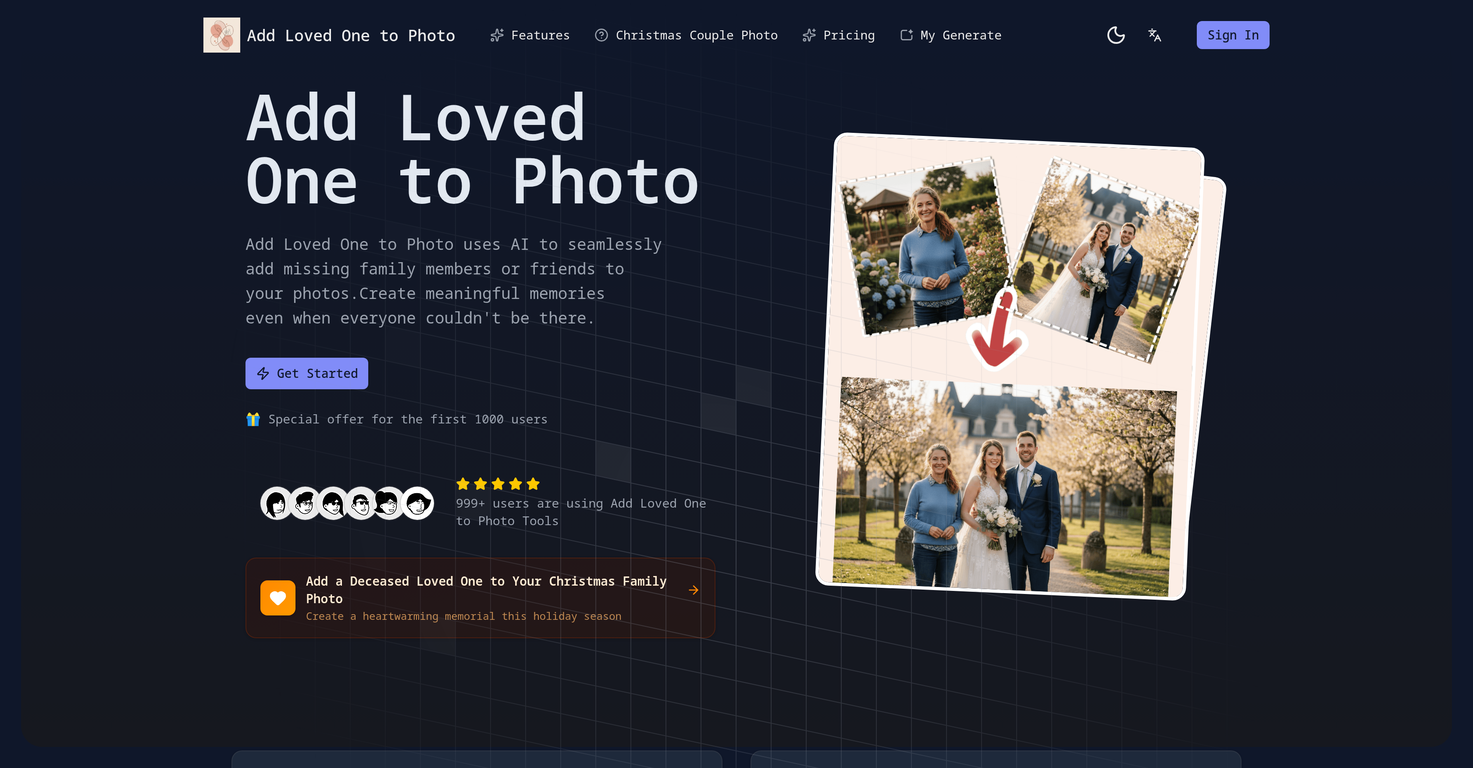
Add Loved One to Photo is an advanced AI-powered photo editing tool designed to add missing loved ones into photographs. It allows for the creation of comprehensive and memorable family pictures even when not everyone could be present for the photo shoot, replicating a natural, blended integration of the added individuals.
How does 'Add Loved One to Photo' work?
Add Loved One to Photo works by using artificial intelligence to incorporate a person into an existing picture in a seamless and natural-looking fashion. It adjusts elements such as lighting, perspective, and style to ensure that the added person fits in perfectly with the original picture.
What is the process for using 'Add Loved One to Photo'?
To use Add Loved One to Photo, first upload the group photo. Next, provide a clear picture of the individual you wish to add. You can customize the aspect ratio of the output photo based on your preference. The AI then processes the inputs to create a high-resolution photo incorporating the added person.
Does 'Add Loved One to Photo' maintain the privacy and security of my data?
Yes, Add Loved One to Photo is committed to maintaining the privacy and security of your data. It ensures that your photos and data are processed securely, and they are never shared with third parties.
How does 'Add Loved One to Photo' ensure the added person matches the lighting and style of the original photo?
Add Loved One to Photo utilizes advanced AI algorithms to match the added person's lighting with that of the original photo, thus ensuring a natural and seamless integration. This sophisticated technology automatically adapts the lighting conditions to achieve realistic results.
Can 'Add Loved One to Photo' be used to add deceased loved ones to family photos?
Yes, Add Loved One to Photo can be used to add deceased loved ones to family photos. This capability is particularly helpful in creating heartfelt memories and honoring loved ones who are no longer with us.
Does 'Add Loved One to Photo' adjust facial expressions to match the mood of the photo?
Indeed, Add Loved One to Photo has the capability to adjust the added person's facial expressions to match the mood of the original group photo. This feature is part of the AI's advanced technology that allows for naturalistic and discerning edits.
Can 'Add Loved One to Photo' restore old family pictures?
Yes, Add Loved One to Photo can restore old family pictures by seamlessly adding high-quality images of relatives from different photos, making it an ideal tool for preserving family history.
How fast does 'Add Loved One to Photo' process images?
The specific processing time for Add Loved One to Photo can be less than 30 seconds, depending on the complexity of the photo and the number of individuals added.
Who typically uses 'Add Loved One to Photo'?
Add Loved One to Photo is used by a diverse group of people, ranging from families wanting to create complete family memories, to wedding photographers, professional photographers, and family historians aiming to create or restore meaningful photos.
Can 'Add Loved One to Photo' be used to create a high-resolution photo?
Yes, Add Loved One to Photo creates high-resolution output images suitable for printing and framing, making it not only a memory-creating tool but also an excellent match with different print media.
Can I customize the aspect ratio of the output photo using 'Add Loved One to Photo'?
Absolutely! With Add Loved One to Photo service, users can customize the aspect ratio of the output photo based on their preference.
How does 'Add Loved One to Photo' ensure added people look natural in the photo?
Add Loved One to Photo uses its artificial intelligence technology to ensure that the added person looks natural in the photo. This is achieved by carefully blending the person into the existing photo and matching lighting, perspective, and style.
Does 'Add Loved One to Photo' share user photos with third parties?
No, Add Loved One to Photo does not share user photos with third parties. The tool is fully committed to ensuring user data privacy and security.
Can I use 'Add Loved One to Photo' for professional photographs?
Absolutely! Professional photographers can use Add Loved One to Photo to offer transformative services to their clients. It is commonly leveraged by wedding photographers and others who aim to make memorable, complete family photos.
Does 'Add Loved One to Photo' match the added person's facial expressions to the mood of the group photo?
Yes, Add Loved One to Photo has the capability to adjust the facial expressions of the added individuals to match the mood of the group photo, helping to create a seamless and natural-looking final image.
What kind of photos work best with 'Add Loved One to Photo'?
While the site does not specify which photos work best, the advanced AI technology used in Add Loved One to Photo caters to a wide variety of photo formats and scenarios. The key to a successful outcome is providing a clear picture of the person to be added.
Does 'Add Loved One to Photo' allow customization of output images?
While the platform does not explicitly mention output image customization, it allows users to customize the aspect ratio of the output photo, providing some degree of flexibility in output formatting.
What file size restrictions are there for images uploaded to 'Add Loved One to Photo'?
Images uploaded to Add Loved One to Photo must not exceed a size of 10MB. This restriction ensures efficient processing and high-quality results.