
 GitLab Transcend - Intelligent orchestration
 Mini tools
Filently
 AI filing layer for your existing Google Drive







Go to 💼 Business
📢
Marketing
(2417)
🔍
Industries
(1042)
💾
Data
(928)
💼
Sales
(743)
💰
Finance
(406)
👔
Management
(330)
💡
Startups
(309)
⚖️
Legal
(265)
👔
HR
(244)
🔒
Security
(213)
📈
Business strategy
(209)
📅
Meetings
(132)
📊
Product management
(125)
📞
Calls
(43)
💻
Tech support
(38)
🤝
Networking
(37)
💻
Virtual employees
(30)
🤖
Enterprise
(15)
🚀
Business innovation
(13)
💼
Freelancing
(12)
 CleeAI
 GetSpiced
 Starnus
 Activepieces
 Avataar's GenAI Creator
 Olivya
 Abstra
 DoubleO
 Pipefy
 AI Agents
 Sreda.ai
 Neferdata
 Quixl
Quixl
 Cubeo
Cubeo
 Sema4.ai
 Ridvay
 Tray.io
 Cognition by Mindcorp
 GoodWork
 Mr David
CleeAI
14,815
GetSpiced
9,792
Starnus
6,859
Activepieces
5,894
Avataar's GenAI Creator
5,595
Olivya
4,614
Abstra
3,932
DoubleO
3,631
Pipefy
3,571
AI Agents
2,857
Sreda.ai
2,804
Neferdata
2,560
Quixl
2,481
Cubeo
2,351
Sema4.ai
2,189
Ridvay
1,562
Tray.io
1,319
Cognition by Mindcorp
1,241
GoodWork
1,209
Mr David
672
Go to 💾 Data
📂
Files
(229)
📊
Data analysis
(229)
📊
Market research
(174)
🔍
Data extraction
(106)
📊
Data visualization
(68)
🗄️
Databases
(43)
📊
Data entry
(25)
🗄️
Data management
(24)
📊
Business analysis
(18)
🏷️
Data labeling
(6)
🔒
Data anonymization
(2)
🧩
Data modeling
(2)
🔀
Synthetic data
(2)
 genset
genset
50

Filently
Use tool
2,985
No ratings
Inputs:
Outputs:
AI filing layer for your existing Google Drive
Overview




Overview
Socials:





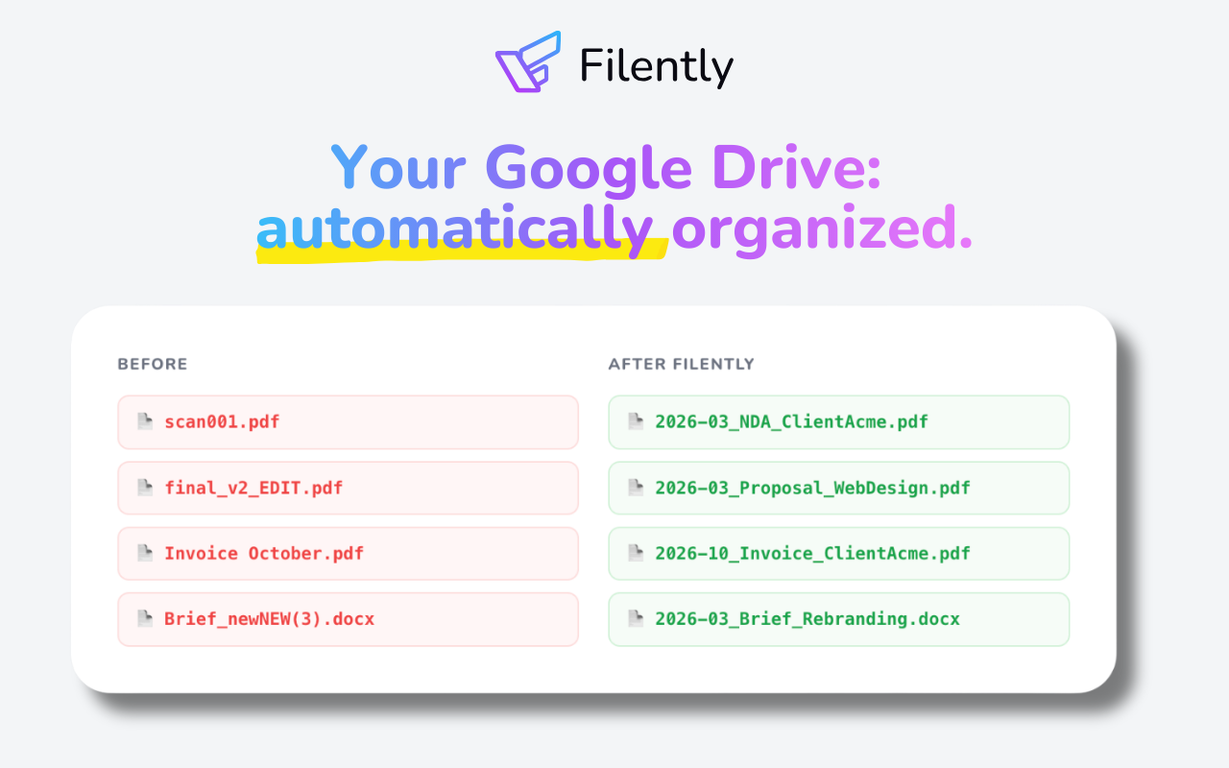
Filently is an AI file organizer and automatic file renamer for Google Drive. It automatically identifies, renames, and organizes new incoming documents according to your naming convention and folder structure. No prompts, no manual sorting, no rules to configure.
Instead of spending hours sorting folders and renaming files, Filently applies your naming convention and files every document in the right place the moment it arrives. No more "Scan_0147862.pdf". Just a clean, consistent, and searchable Google Drive.
For freelancers, agencies, and small businesses drowning in documents. If your Google Drive looks like a graveyard of unsorted files, Filently is built for you.
Filently connects to your existing Google Drive and works with your current folder structure, or helps you build a clean one from scratch. Your files stay in Google Drive. No migration, no new infrastructure, no vendor lock-in.
Supports PDF, Microsoft Office, OpenDocument formats, and images containing text across 20+ languages. Any other file type can be organized by filename.
Hosted in Switzerland and the EU. Focused on user data privacy. Your data is never used for AI training. Dropbox, OneDrive, and more coming soon.
Key Features
- Automatic File Renaming
- Ai Document Identification
- Automatic Folder Routing
- Custom Naming Conventions
- Smart Folder Structure Creation
- Google Drive Native Integration
- 20+ Language Support
- Swiss Made & Casa Tier 2 Certified
Show more
Releases
Get notified when a new version of Filently is released
Notify me
May 31, 2026
Initial release of Filently.
Author

@sophia-falck-ytter
We're building Filently: the AI filing layer for Google Drive that automatically identifies, renames, and organizes documents. No more manual sorting, no DMS migration. Previously built marketing software for real estate agents. Now obsessed with eliminating digital bureaucracy one misnamed file at a time. Building in public. Always happy to connect. 💜
Follow
Pricing
Pricing model
Free Trial
Paid options from
$6/month
Billing frequency
Monthly
Keeping you safe
Good to know
Top alternatives
-
 Cloud file organization and retrieval made efficient.
 Matt Castaldo🛠️ 1 tool 🙏 52 karmaOct 18, 2023@DokkioMatt here from Dokkio support! Thanks for checking out our page. If you'd like a free demo of Dokkio, please do not hesitate to reach out to [email protected]
 -
 Organize files automatically with AI
 -
 Private AI that finds your files
 -
 AI-powered file management for effortless organization.
 -
 Scan, organise & search your files with AIFilex AI seems useful for people dealing with too many documents and scattered files daily. I like tools that make finding and organizing information feel faster instead of turning file management into another chore.
 -
 Your AI-powered file organizer that respects privacy for macosGood Replacement for the sparkle. Keep it up


Related topics
#960
0
0



