Can you tell me more about the AI-assisted editing in Nimbalyst?
In Nimbalyst, the AI-assisted editing is powered by Claude Code and Codex integration. This feature offers context-aware editing, helping users to understand and work on their files while considering the full project structure, related files, and intent. The AI can also provide suggestions for efficient coding and data management.
What are Claude Code and Codex in Nimbalyst?
Claude Code and Codex in Nimbalyst are AI tools integrated within the platform. These tools enhance productivity by offering AI-assisted, context-aware editing. They help understand the project structure, related files and intent, and aid in the generation of code and data transformations.
How does the AI code generation in Nimbalyst work?
The AI code generation in Nimbalyst works in tandem with Claude Code and Codex. These tools can create, refactor, and debug code working directly in the file alongside the user. This accelerates the coding process and improves efficiency.
How can I review AI edits in Nimbalyst before applying them?
In Nimbalyst, you can review AI edits before applying them. Every AI edit is shown as a diff, which users can inspect and approve before integrating into their file. This full control promotes precision and eliminates unwanted changes.
Does Nimbalyst offer any sorting or task management features?
Yes, Nimbalyst does offer sorting and task management features. It enables users to organize their tasks and sessions on a kanban board by phase: backlog, planning, implementing, complete. This lets users see their full workstream at a glance.
Can I use Nimbalyst for spreadsheet editing?
Yes, you can use Nimbalyst for spreadsheet editing. It has a feature that lets you edit CSV data in a familiar spreadsheet view. Claude Code and Codex will understand the structure and context of your data, while allowing CSV file edits within Nimbalyst instead of forcing a switch between editors and terminals.
What is the Visual UI planning feature in Nimbalyst?
The Visual UI planning feature in Nimbalyst allows users to design wireframes and mockups visually. Claude Code and Codex can understand your project and generate matching code, bridging the gap between design and implementation. This allows users to iterate and review agent changes real-time.
How does Nimbalyst help in system architecture diagramming?
In terms of system architecture diagramming, Nimbalyst allows users to create and modify Excalidraw diagrams using natural language. Claude Code and Codex can place, connect, and style elements, making it easy to map system architectures, flows, and processes visually.
What's the future plan for Nimbalyst's extension to the iOS framework?
Nimbalyst's future plan for extension to the iOS framework involves launching a mobile application. This would allow users to start new sessions, monitor running sessions, review agent work, and chat with Claude Code and Codex from their iPhone, creating a seamless way to continue work from anywhere.
How does the context-aware editing feature of Nimbalyst help in project management?
The context-aware editing feature of Nimbalyst aids in project management by understanding the full project structure, related files, and intent while editing Markdown files. Users can interact with Claude Code and Codex side-by-side while working on their Markdown, without needing to switch context. It allows them to review and approve AI edits, resulting in more efficient and controlled project management.
What are Nimbalyst's capabilities in terms of AI-powered data transformations?
Nimbalyst provides AI-powered data transformations using Claude Code and Codex. Users can ask these tools to filter, sort, reshape, or enrich their data, which are then applied directly to the file. This feature aids in the efficient management of data.
How does Nimbalyst enhance productivity for developers, product managers, and designers?
Nimbalyst enhances productivity for developers, product managers, and designers by providing a visual platform for collaboration on files, sessions, and tasks. The integration of Claude Code and Codex facilitates AI-assisted, context-aware editing. The platform also supports different types of files, streamlined coding and data management via AI, session and task management, visual UI planning, and concise project awareness for code editing.
What is an agent-native visual workspace in the context of Nimbalyst?
In the context of Nimbalyst, an agent-native visual workspace refers to a platform where users can collaborate on various tasks using visual aids. It's referred to as 'agent-native' because it incorporates intelligent AI agents like Claude Code and Codex natively into the workspace, enabling AI-assisted functions like context-aware editing, AI-powered data transformations, and AI code generation.
What is Nimbalyst?
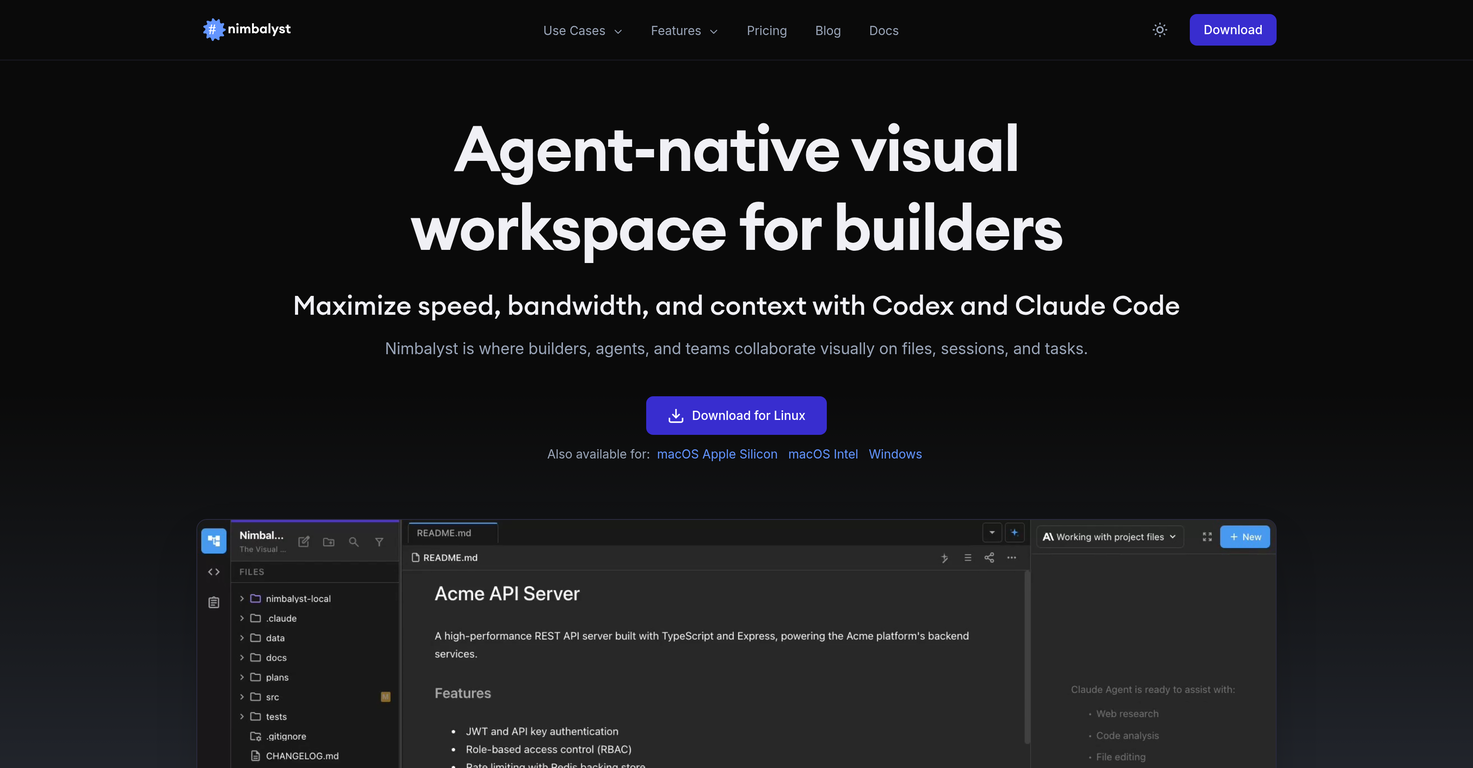
Nimbalyst is an agent-native visual workspace designed for builders like developers, product managers, and designers. It uses Artificial Intelligence to promote collaboration and enhance productivity, by understanding and assisting with the complete project structure and intent.
What is the main purpose of Nimbalyst?
The main purpose of Nimbalyst is to provide a collaborative platform where users can visually work on files, sessions, and tasks. It offers various features such as AI-assisted editing, spreadsheet editing, visual UI planning, and task management to enhance productivity and efficiency.
How does Nimbalyst facilitate collaboration?
Nimbalyst facilitates collaboration through various tools such as Claude Code and Codex that enhance productivity by providing AI-assisted, context-aware editing. Users can work on their tasks while the AI tools understand and assist with the full project structure and intent. Real-time collaboration is also supported for iterative design.
What types of files does Nimbalyst support?
Nimbalyst supports various types of files, including but not limited to Markdown, CSV, Mockup Code, and Excalidraw diagrams.
How does Nimbalyst use AI technology to enhance productivity?
Nimbalyst uses AI technology, specifically the integration of Claude Code and Codex, to enhance productivity through features such as AI-assisted, context-aware editing. These tools understand the full project structure, related files and intent, enabling users to work efficiently. This technology also powers functions like AI code generation and AI-powered data transforms.
Does Nimbalyst offer spreadsheet editing?
Yes, Nimbalyst offers spreadsheet editing. Users can edit CSV data in a familiar spreadsheet view while Claude Code and Codex understand the structure and context of the data.
Can I review AI edits in Nimbalyst before applying them?
Yes, users can review AI edits in Nimbalyst before applying them. Every AI edit is surfaced as a difference that can be inspected and approved before landing in the user's file. This promotes user control over the changes made.
Does Nimbalyst have task management features?
Yes, Nimbalyst has task management features. It offers an integrated environment for session and agent management, allowing users to manage tasks efficiently with a full task tracking system built in.
How does Nimbalyst integrate with iOS?
Nimbalyst is currently working on extending its functions to the iOS framework. Users will be able to start new sessions, monitor running sessions, review agent work, and chat with Claude Code and Codex from their iPhone. They can also pair with desktop Nimbalyst in seconds and stay connected to their work from anywhere. However, specifics about the iOS integration are not available at the moment.
Can Nimbalyst generate AI code?
Yes, Nimbalyst can generate AI code. With the help of Claude Code and Codex, it can generate, refactor, and debug code directly in the file alongside the user.
How does Nimbalyst assist with visual UI planning?
Nimbalyst assists with visual UI planning by allowing developers to design wireframes and mockups visually, while Claude Code and Codex understands the project and can generate matching code.
What is the role of Claude Code and Codex in Nimbalyst?
Claude Code and Codex are integrated AI tools within Nimbalyst that provide AI-assisted editing. They work to understand the full project structure, related files and intent thereby helping users with AI code generation, data transformation, diagram creation, schema design, among other things, which enhances productivity while working on Nimbalyst.
Can I use Nimbalyst to create and modify diagrams?
Yes, users can use Nimbalyst to create and modify diagrams like Excalidraw and Mermaid diagrams. Claude Code and Codex assist in placing, connecting, and styling elements when diagrams are created and modified using natural language.
How does Nimbalyst aid in database schema design?
Nimbalyst aids in database schema design by allowing users to design database schemas and entity relationships visually. Claude Code and Codex understand the full data model and can even generate a complete, normalized schema as a visual diagram.
How does Nimbalyst handle session and task management?
Nimbalyst handles session and task management by offering an integrated session management and agent management environment. It allows users to organize sessions on a Kanban board by phase and track the files modified in a session. The platform has a full task tracking system built in, enabling users to track plans, bugs, ideas and more. Agents can create tasks, edit them, move them between statuses, and mark them complete, as part of their normal workflow.
Can Nimbalyst understand and assist with the full project structure?
Yes, Nimbalyst can understand and assist with the full project structure. Its integrated AI tools, Claude Code and Codex, enable this feature allowing users to work directly in their markdown or other files while the AI simultaneously comprehends the full project structure, related files, and intent.
Can I use Nimbalyst to edit CSV data?
Yes, users can use Nimbalyst to edit CSV data. The platform's integrated AI tools, Claude Code and Codex, will understand the structure and context of the data, transforming it directly in the file.
Does Nimbalyst support real-time collaboration?
Yes, Nimbalyst supports real-time collaboration. Users can edit the drawing directly and iterate on drawings conversationally with their agent. This also applies to the task management feature where tasks can be edited and organized in real time.
What industries or groups would benefit the most from using Nimbalyst?
The groups that would benefit the most from using Nimbalyst are developers, product managers, designers, and builders in general, along with their respective teams. It aids in collaboration on files, sessions, and tasks and enhances efficiency and productivity.
Can Nimbalyst generate a normalized schema as a visual diagram?
Yes, Nimbalyst can generate a normalized schema as a visual diagram. When users describe their data needs, Claude Code and Codex can generate a complete, normalized schema as per the requirements. The output can be exported as Prisma schema files, ready for use in the users' application.