What kind of social media platforms does PixelMotion support?
PixelMotion supports a variety of social media platforms, including but not limited to YouTube, Instagram, and TikTok. You can create, optimize, and directly post compelling video content on these platforms with PixelMotion.
Is PixelMotion suitable for individual creators and larger agencies?
Absolutely, PixelMotion is suitable for both individual creators and larger agencies. Its tools and features, such as scalable content creation, automated workflow, effective photo enhancement, and strategic content marketing tools, are designed to be as helpful for solo creators as they are for established agencies.
What is the business search tool provided by PixelMotion?
The Business Search tool provided by PixelMotion aids in discovering potential clients. This feature allows users to identify businesses by searching for specific types or locations, further facilitating the growth of your content business.
How does the flexible credit system of PixelMotion work?
PixelMotion employs a flexible credit system where users only pay for the resources they use. This system ensures that the user's investment is directly proportional to their utilization of the platform's tools and resources.
Can I use PixelMotion to scrape images from websites?
Yes, PixelMotion provides the option to scrape images from websites. Users can either directly upload images or scrape them from any web platform using the built-in feature, which makes gathering creative assets more efficient.
What specific AI models does PixelMotion offer for content creation?
PixelMotion hosts multiple dedicated AI models for enhancing images and creating video content. This includes advanced features like AI upscaling, restoration, photo quality assessment, and detailed enhancements. The platform is continuously updated with the latest models to ensure efficient and effective content creation.
How does PixelMotion assist with YouTube, Instagram, and TikTok marketing?
PixelMotion's features are designed to assist with YouTube, Instagram, and TikTok marketing. The platform enables the creation of attractive videos suitable for these channels from enhanced images. Further, it offers options to directly share the created content on these platforms, facilitating efficient social media marketing.
Does PixelMotion offer photo restoration and upscaling services?
Yes, PixelMotion offers photo restoration and upscaling services. The platform's AI models specialize in enhancing photo quality by AI upscaling, restoration, and additional detailed enhancements, transforming them into high-quality assets for content creation.
How does PixelMotion automate content creation?
PixelMotion uses advanced AI to automate several steps in the content creation process. This includes uploading or scraping images from any website, assessing and enhancing image quality, and then transforming those images into stunning videos ready to be shared on social media platforms.
Is PixelMotion optimized for AI Image to Video conversion?
Yes, PixelMotion is optimized for AI Image to Video conversion. It utilizes advanced AI models to transform enhanced images into attractive videos suitable for digital marketing and social media content.
Does PixelMotion include a feature for photo quality assessment?
Yes, PixelMotion includes a feature for photo quality assessment. Using its advanced AI algorithms, the tool assesses pictures for quality and optimizes each image, ensuring you use only the best photos for your content.
What are the AI models available on PixelMotion?
PixelMotion offers a variety of AI models, including 9 for photo enhancement and 11 for video generation. Some of these models include Qwen Image 2512, Luma Ray2, Runway Gen-3, Flux, and more.
Is there a pay per use option on PixelMotion?
Yes, PixelMotion offers a 'pay per use' system through its flexible credit system. Users only pay for the resources they use, with the platform ensuring that the purchased credits never expire, thus introducing a cost-friendly solution for content creators.
Can PixelMotion help in discovering potential clients?
Yes, PixelMotion can assist in discovering potential clients. By using the Business Search tool offered by the platform, users can find and reach out to potential clients according to the type of business and location.
What is PixelMotion?
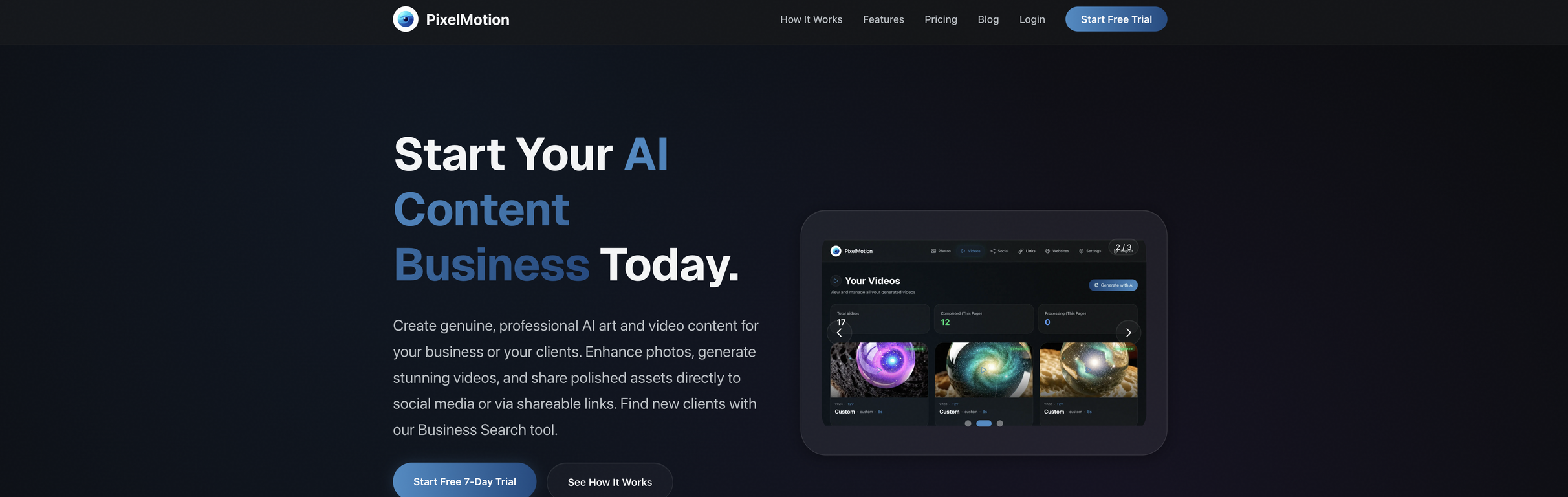
PixelMotion is an AI-powered tool developed to facilitate content creation at scale, turning photos into high-quality videos. It uses advanced AI models to enhance photos and create compelling video content for various social media platforms. PixelMotion is designed to streamline the content creation process, providing features like image upscaling, restoration, direct social media posting, web scraping, a Business Search tool for client discovery, and more. What sets it apart is its emphasis on helping scalable content businesses achieve efficiency and effectiveness.
How does PixelMotion use AI to enhance photos?
PixelMotion uses AI models to automatically assess and enhance photos. Users can upload or scrape images from any website for the AI to analyze. Each image is then given a quality score. Users can upscale, sharpen, and restore photos using PixelMotion's suite of AI models, effectively transforming them into professional-grade images. The AI models, such as the Crystal Upscaler, Magic Refiner, Real-ESRGAN and GFPGAN, achieve image enhancement by adding detailed enhancements, upscaling, and restoration.
What social media platforms does PixelMotion support for direct posting?
PixelMotion supports direct video posting to YouTube, TikTok, and Instagram. With just a click, users can share the videos they create directly on these platforms, streamlining the process and reducing the need for any additional platforms to share content.
What is the Business Search tool in PixelMotion?
The Business Search tool in PixelMotion is a feature that allows users to search for businesses by type and location. It is designed to help users discover potential clients, providing an additional avenue for prospecting and business growth. The tool can scrape websites and assist in generating sample content for pitching.
Can PixelMotion help me find potential clients?
Yes, PixelMotion can help you find potential clients. The Business Search tool facilitates this process. You can search for businesses based on their type and location. Moreover, the AI capabilities of the tool allow for scraping of these discovered websites, providing potential materials for content creation and proposals.
How does PixelMotion's credit system work?
PixelMotion employs a flexible credits system where users pay only for the resources they use. They are granted a monthly allowance and can purchase additional credit packs whenever needed. These credits are used to access AI features within the platform. The costs vary by the model used; for example, basic operations start with 1 credit, while using specific, premium AI models may cost more. The key aspect of this system is that the credits never expire, and users can hold onto them for use anytime they require.
Which specific project needs can PixelMotion cater to with its AI models?
PixelMotion caters to a wide spectrum of specific project needs using its superior AI models. Whether it's photo enhancement, video creation, social media content management, image quality analysis, photo upscaling and restoration, video creation with only text prompts, or even web scraping and client search, the AI capabilities of PixelMotion handle these tasks. Each of these functionalities serves to streamline the workflow, making it a powerful tool for various content creation projects.
Can PixelMotion help to upscale and restore photos?
Yes, PixelMotion does help upscale and restore photos. The AI models analyze the quality of every image, providing feedback via a quality score. Depending upon this score, users can upscale and restore photos using its range of AI models. This transforms any image quality, regardless of whether it's high or low resolution, into enhanced, professional-grade images.
What types of businesses is PixelMotion suitable for?
PixelMotion is suitable for a wide range of businesses. This includes freelancers focused on creating professional content for clients, marketing teams who wish to scale their content production without a proportional increase in headcount, and small business owners interested in transforming their product photos into marketing videos. Its comprehensive set of tools and AI capabilities make it an invaluable tool in any context where content creation and management at scale are crucial.
Does PixelMotion offer a free trial?
Yes, PixelMotion does offer a free trial. They offer a free 7-day trial, with no credit card required to sign up. This allows users to test out the functionalities and AI capabilities of PixelMotion before committing to a subscription plan.
How does PixelMotion create videos from photos?
PixelMotion utilizes AI models to transform photos into videos. After an image is uploaded or scraped from a website, the AI models assess the quality of the image and give it a quality score. Depending on this score, the models enhance the images, which are then transformed into engaging videos. Users also have access to 11 premium AI models such as Sora 2, Veo 3.1, Luma Ray2, and Runway Gen-3 to enable video creation from photos or custom text prompts.
Can I upload images from websites using PixelMotion?
Yes, you can upload images directly to PixelMotion from your device, or scrape them from any website. The tool is designed to support both these functionalities, giving users flexibility in choosing the source of their images depending upon their project requirements. The AI then assesses the quality of each scraped or uploaded image.
How does PixelMotion analyze and enhance image quality?
PixelMotion analyzes and enhances image quality by using proprietary AI models. These models assess each uploaded or scraped image and assign it a quality score. If the image quality is not optimal, PixelMotion allows users to apply various enhancement models to the images. The AI enhancement suite includes upscaling, restoration, and detailed enhancement features, which significantly improve the quality of the images.
Can I use PixelMotion to scrape images from any website?
Yes, PixelMotion enables users to scrape images from any website. Once a website URL is inputted, the AI crawls every page and pulls all the images automatically. The tool facilitates real-time scraping progress, allowing users to quickly and seamlessly collect images for their content creation needs.
What AI models does PixelMotion use for photo enhancement and video generation?
PixelMotion utilizes a variety of AI models for photo enhancement and video generation. For enhancing images, it uses seven professional models including the Crystal Upscaler, Magic Refiner, Real-ESRGAN, Recraft Crisp, GFPGAN, Nano Banana Pro, and GPT Image 1.5. For video creation, it utilizes premium video generation models such as Sora 2, Veo 3.1, Luma Ray2, Runway Gen-3, and Kling.
Does PixelMotion offer platform recommendations and auto-categorizing?
Yes, PixelMotion does offer platform recommendations and auto-categorizing. The AI writes descriptions, suggests platforms, and automatically categorizes each image. This automated process helps users understand which photos are most suited to their project needs, and which platform will be most effective in sharing their content.
Can PixelMotion generate videos using only text prompts?
Yes, PixelMotion is capable of generating videos using only text prompts. This feature adds considerable flexibility to the video creation process, allowing users to express their creativity and produce unique videos without the need to start with photos. This capability means that content creators can start with an idea or concept expressed textually and rely on PixelMotion's advanced AI models to bring this concept to life in video form.
What types of clients can I find using the Business Search tool on PixelMotion?
With the Business Search tool, you can find potential clients based on their business type and location. Whether you're searching for food businesses in a specific city or tech startups globally, the Business Search tool is equipped to help you locate the specific type of potential client you're interested in targeting.
What types of photos am I able to enhance using PixelMotion?
PixelMotion allows you to enhance a wide range of photos. You can upload any photo directly or scrape them from any website. Every image gets a quality score from 0-100, and based on the score, you can apply various AI models to upscale, sharpen, and restore photos. Whether it's a casual photograph or a professionally taken one, you're able to make enhancements and use them for creating stunning videos.
Why is PixelMotion described as a tool for 'Professional Asset Sharing'?
PixelMotion is described as a tool for 'Professional Asset Sharing' as it not only enables the creation of professional-grade content but also the sharing of that content. It allows users to post the videos created directly to platforms like YouTube, TikTok, and Instagram. Moreover, it enables the creation of shareable links with view tracking and professional client portfolio pages. This position PixelMotion as a platform that combines content creation with an effective, professional distribution mechanism, making it adept at both creating and sharing digital assets.
 MongoDB - Build AI That Scales
 Mini tools
 Turn photos into stunning AI videos.
 freebeat AI
 D-ID
D-ID
 MagicLight
 HeyGen
 Kaiber
 Sora
Sora
 Seedance
 AI Video Generator by RenderFlow AI
 Kling
Kling
 Manga TV
 BeatViz AI Music Video Generator
 neural frames
 ViGi
ViGi
 Videnly
 Viddo AI - AI Video Generator
 D-ID Creative Reality Studio
 AI Studios
 VideoGen
 Aura AI - AI Video Generator
 CreatorFrames
 So You Want To Be A Writer?
 Ancient AI powered spirits
 Minka
Minka
 Jvb ai
 somacguffin
 Cuty
Cuty
 Superfly Stoner









 kanawati🙏 1,136 karmaMar 26, 2025@freebeat AIThe concept is great.


 0
0





