

 Mini tools
Agentic Loop Engineering
An 18 notebook course that isolates and measures each component of agentic loop engineering on real, industry standard software datasets.
README

The one idea behind all 18 notebooks: a loop is only as good as the verifiable signal it is
wired to. A loop that re-runs an agent against its own opinion barely improves. A loop wired to
an executable check (a test, a schema, a retrieved fact, a real evaluation harness) measurably
does. Everything below is the evidence, produced on a single A100 80GB GPU with a self hosted
open model, captured inline, and traceable to a JSON file inresults/.
Contents
- What is loop engineering
- The anatomy of a loop
- Results at a glance
- Honest findings
- The curriculum
- Architecture and pattern diagrams
- Repository layout
- Getting started
- How it works
- Methodology and honest measurement
- Reproducing the results
- Model and data
- License
What is loop engineering
The leverage point in agentic software work has moved in stages. First prompt engineering:
craft one good prompt and read the reply. Then context engineering: assemble the right files,
docs, and examples for a single turn. Then agent harness engineering: design the environment a
single agent runs in, its tools and permissions and rules. The current frontier is loop
engineering: the design of the recursive system that discovers work, assigns it to an agent,
verifies the result, persists state, and decides the next action until a goal is met or it
escalates to a human.
Most writing about loops is qualitative. This repository is the opposite. Each notebook takes one
component of the loop, frames a problem a single naive attempt does not solve, shows the baseline
failing with real numbers, then shows the component closing the gap, then hardens it against its
documented failure mode, and finally tunes one knob. The notebooks print heavily, render their
charts inline, and embed hand drawn diagrams, so you can follow the entire flow by reading the
saved output without rerunning anything.
The anatomy of a loop
Every component in the course is one box in this picture. The notebooks build it up one box at a
time, then the capstone composes them back together and validates the result against a real
evaluation harness.

📊 Results at a glance
Every row is produced on the same model and hardware and is traceable to results/*.json. The
"Baseline" column is the naive attempt; "With component" is the loop engineering fix.
| # | Component | Dataset (real) | Baseline | With component | Headline |
|---|---|---|---|---|---|
| 00 | Foundations and trustworthy scorer | hand written smoke set (5) | pass@1 0.80 | engine and scorer verified | the instrument is sound before anything is measured |
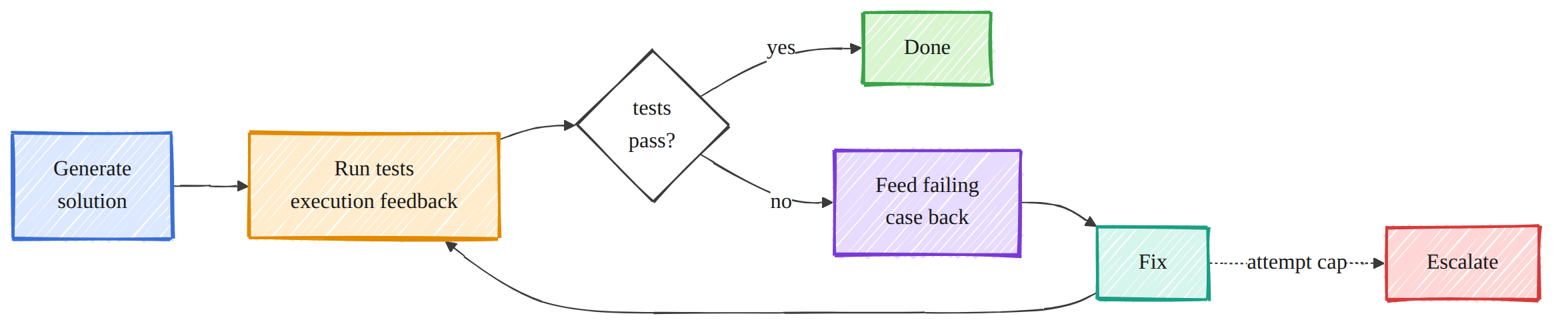
| 01 | The loop (scheduling, run until done) | MBPP+ (60) | pass@1 0.767 | 0.85 with execution feedback | +8.3 points (only +1.7 without feedback) |
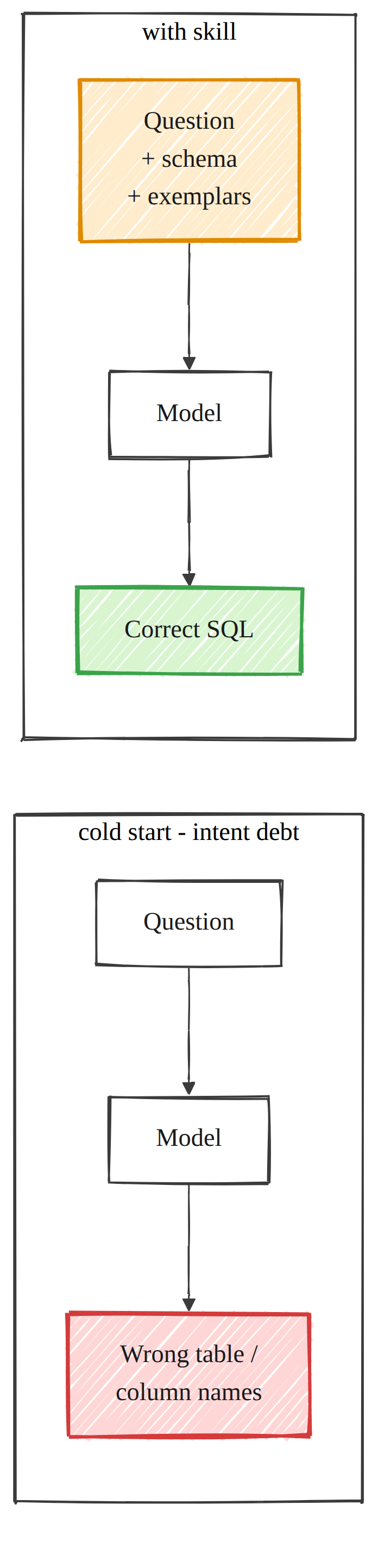
| 02 | Skills and context engineering | sql-create-context (60) | 0% executable, 1.7% valid columns | 95% executable, 100% valid | 0% to 95% executable |
| 03 | Sub agents (maker and checker) | MBPP+ (60, 13 wrong) | 100% false accept (trust all), 77% self grade | 31% with a test running checker | catches 69% of wrong code |
| 04 | Memory and state (retrieval) | project knowledge base (14 questions) | 7% closed book | 100% retrieval augmented | 7% to 100% |
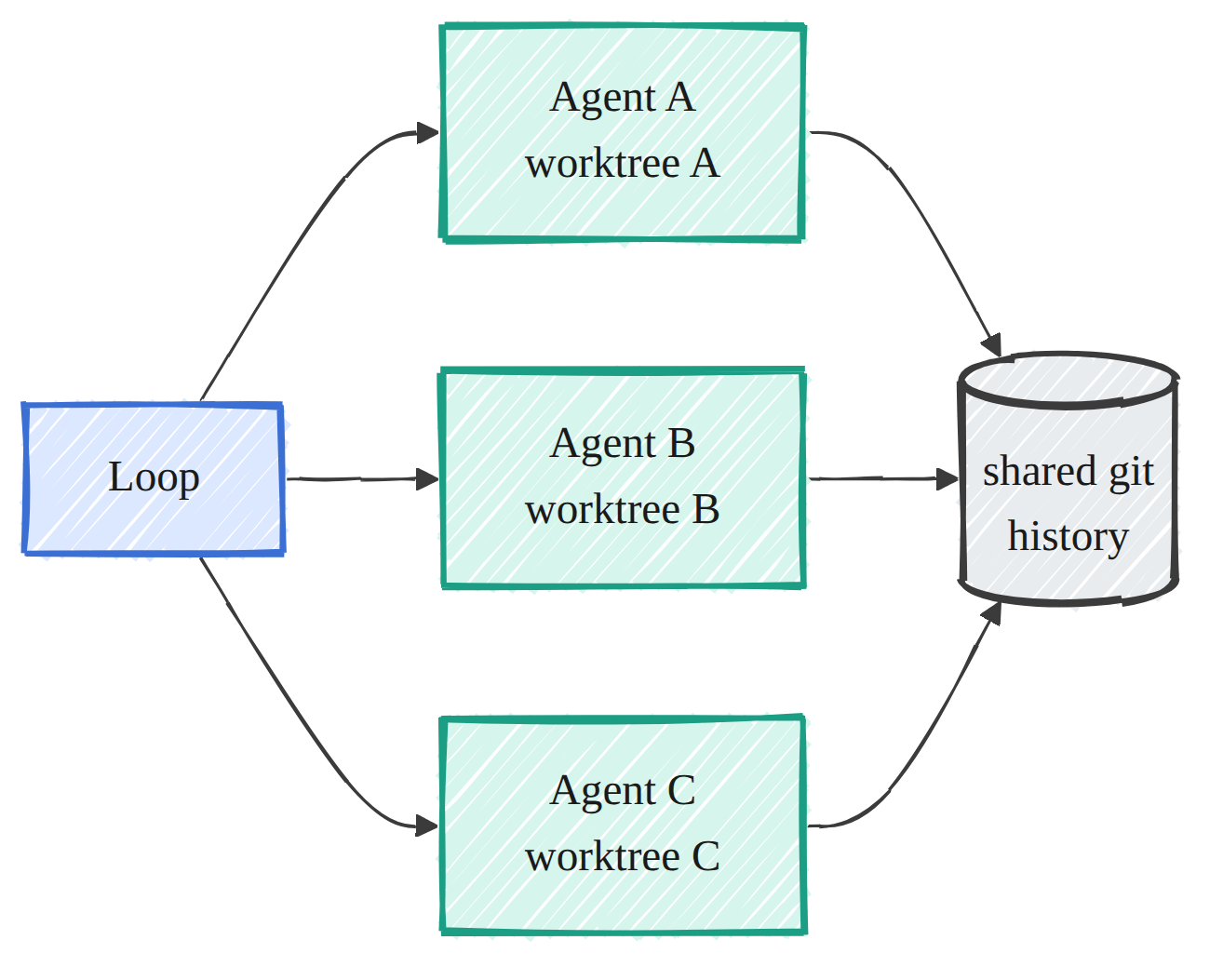
| 05 | Worktrees (parallel isolation) | real git, 6 parallel agents | 17% of work survives | 100% survives | no silent lost updates |
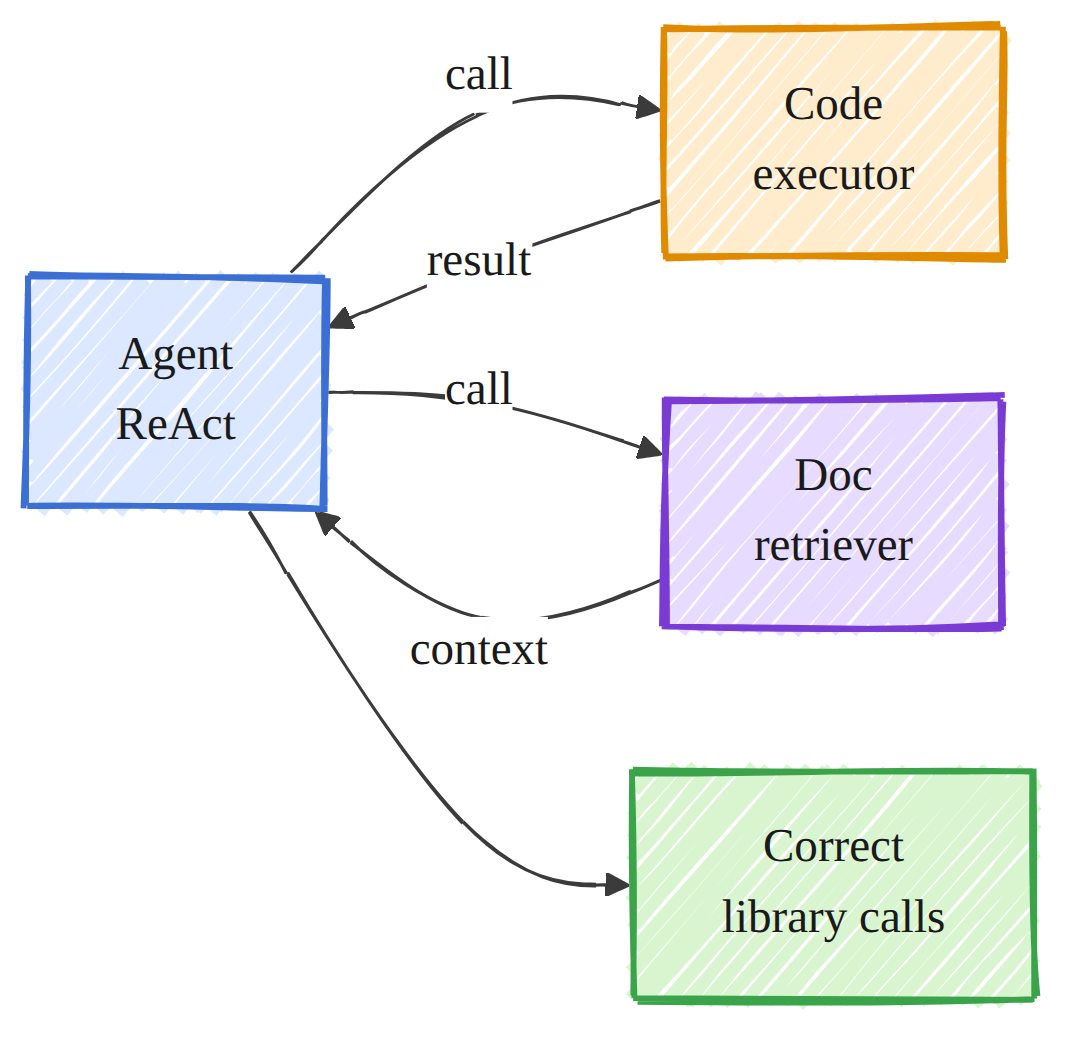
| 06 | Connectors and tools | generated data analysis tasks (30) | 10% no tool | 83% with a code execution tool | +73 points |
| 07 | Multi loop coordination | 3 concurrent loops on one repo | 5 collisions, ~1M tokens wasted | 0 collisions | collisions removed |
| 08 | Budget, cost, observability | meta analysis over the measured runs | n/a | cost model plus a cost and quality frontier | the loop's lift has a measured token price |
| 09 | Safety and guardrails | 57 proposed actions (38 risky) | 60.5% false auto act | 0% | risky changes always escalated |
| 10 | Pattern: Daily Triage | GitBugs hbase (5395 reports, ~5% urgent) | keyword recall 0.35 | embedding classifier recall 0.65 | catches about twice the urgent reports |
| 11 | Pattern: Issue Triage (dedup) | GitBugs hbase (4000 corpus, 107 dup pairs) | TF-IDF Recall@10 0.56 | BGE Recall@10 0.65 | catches semantic duplicates |
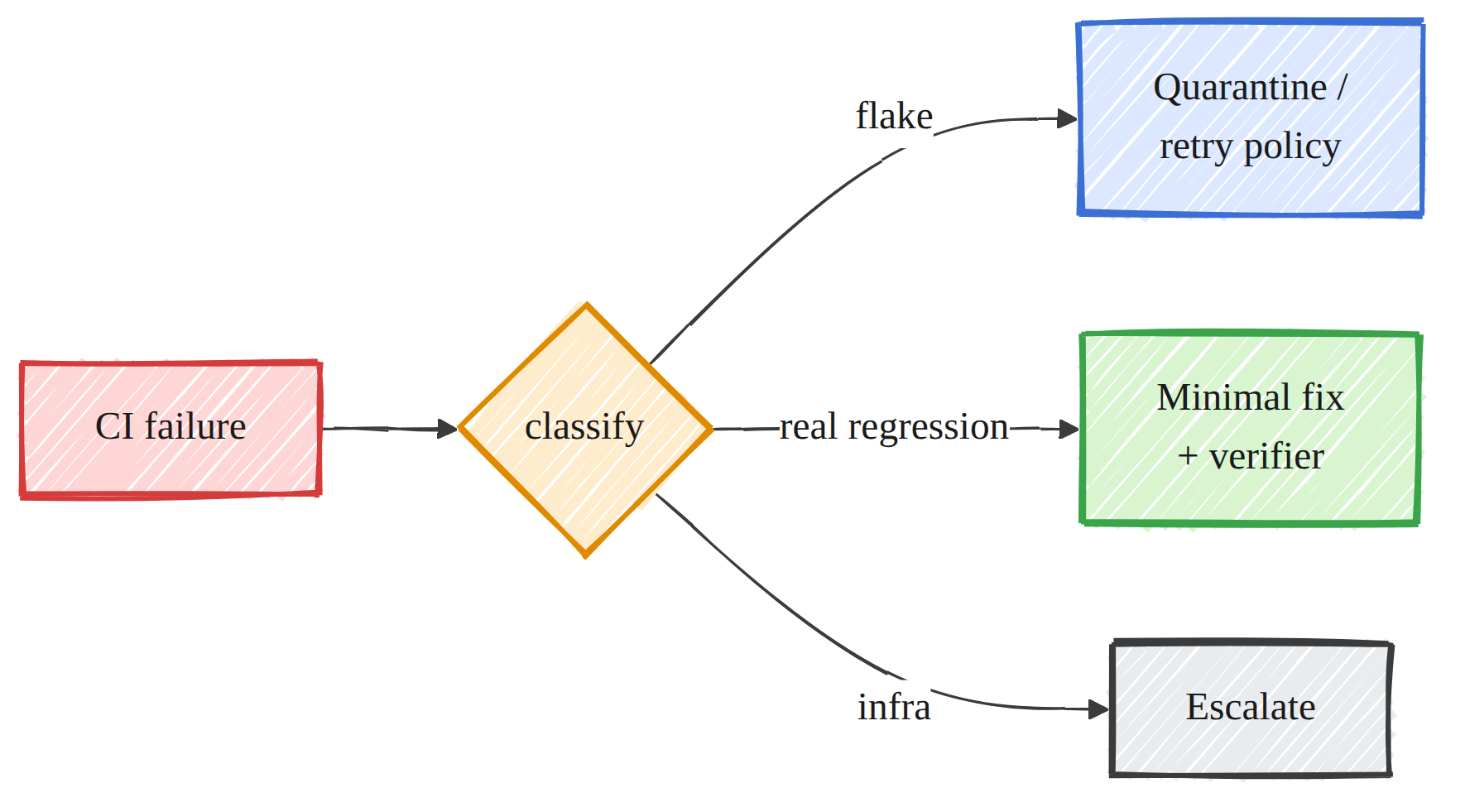
| 12 | Pattern: CI Sweeper | constructed flaky vs real (20) | naive fixes all 20 | classify first fixes the 10 reals | perfect flake classification, ~2M tokens saved |
| 13 | Pattern: PR Babysitter | MBPP+ red PRs (30, 6 red) | naive 33% false ready | verifier gated 0% | no broken PR marked ready |
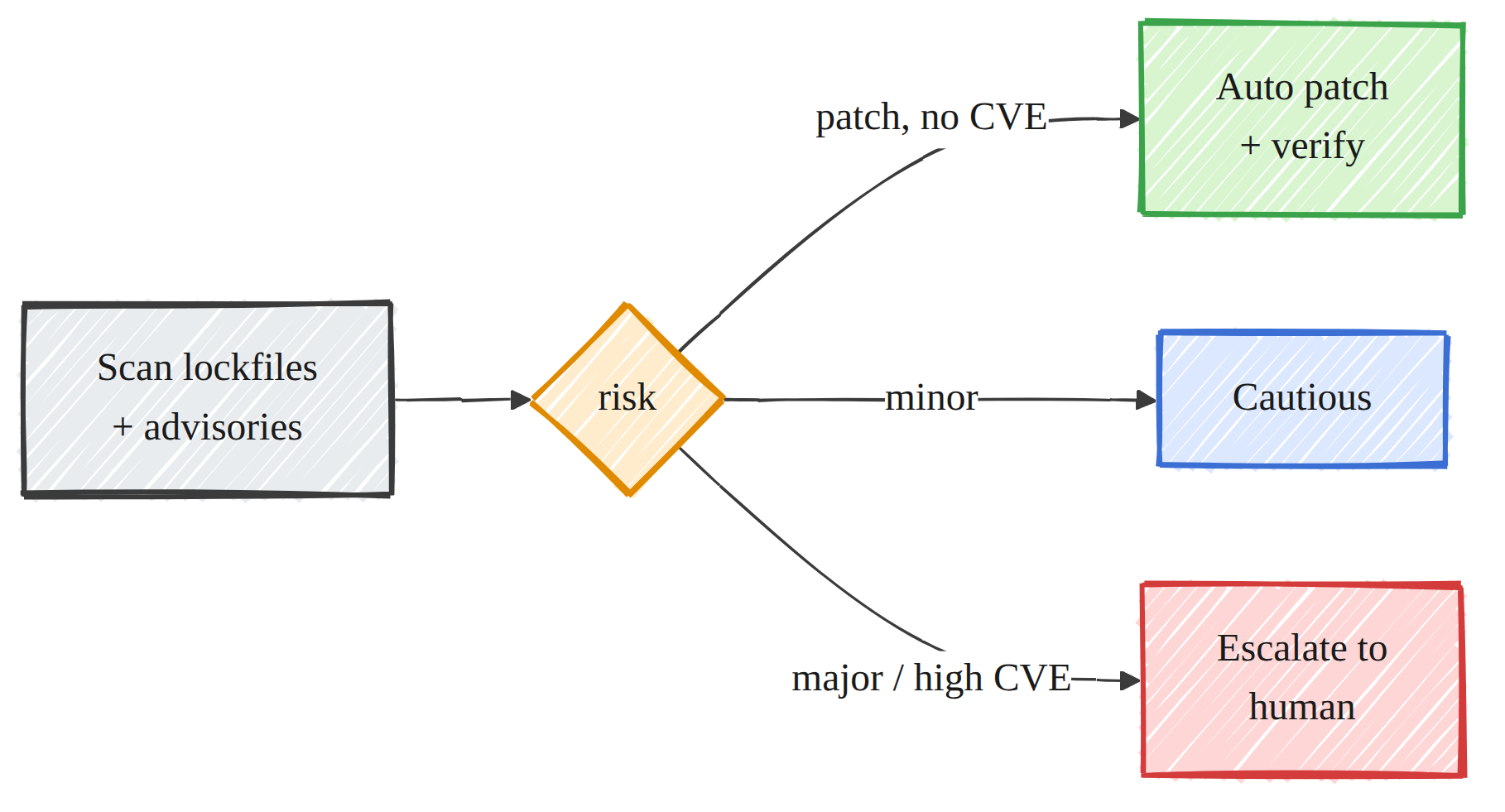
| 14 | Pattern: Dependency Sweeper | semver and CVE scenarios (60, 48 risky) | naive 83% false auto merge | router 0% (safe patches still applied) | risky bumps escalated |
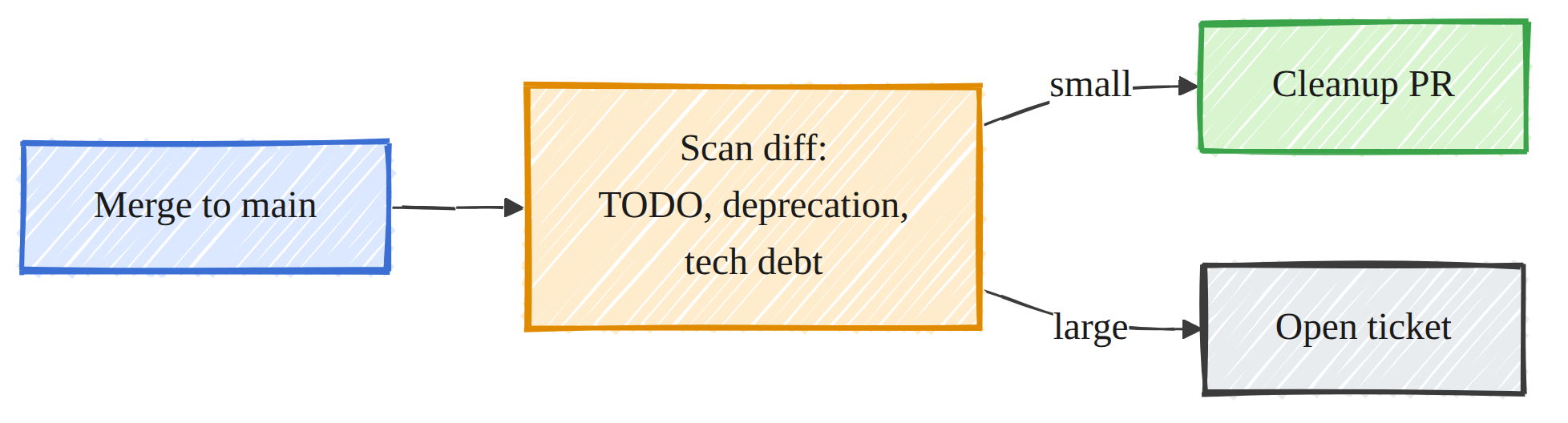
| 15 | Pattern: Post Merge Cleanup | Maldonado SATD (4000 sample) | keyword recall 0.76 | embedding recall 0.86 | catches keyword free tech debt |
| 16 | Pattern: Changelog Drafter | 3.5k real Vue commits (108 balanced) | majority 11% | model 43% macro-F1 | about 4x the baseline, drafts the notes |
| 17 | Capstone: orchestration | MBPP+ (40) plus real SWE-bench | single agent 0.80 | orchestra 0.95 | +15 points; real SWE-bench harness resolved 3 of 3 gold |
Honest findings, kept on purpose
These are the results that did not go the easy way. They are the most useful part of the course.
- Run until done depends on the feedback, not the retry (01). A loop with real test feedback
lifts pass@1 by 8.3 points; the same loop with only "try again" lifts it by 1.7. That gap
reproduces Huang et al. (2023) on real code. The loop also saturates on algorithmically hard
problems, which is why this notebook uses MBPP+ rather than a harder set where the loop went flat. - Best of N added nothing for this model (03). At temperature 0.8 the 32B model is effectively
deterministic per problem, so a selector has nothing to choose between. Rather than manufacture a
win, the notebook measures verifier discrimination instead, which is a clean result. - Closed book is 7%, not 0% (04). A couple of questions are general principles a strong model
can guess. The project specific measured facts are genuinely unguessable, which is why retrieval
still reaches 100%. - Recall up, F1 slightly down (15). The embedding detector raises recall by 9.3 points at the
cost of more false positives, so its F1 dips by 1.4. The notebook reports that honestly and argues
recall is the right objective for a review queue. - More stages are not always better (17). The orchestra beats a strong single agent by 15
points here, but the discussion keeps the MAST framing (Cemri et al., 2503.13657): orchestration
earns its keep only when the extra verification and selection catch real errors.
📚 The curriculum (18 notebooks)
The notebooks are at the top level of the repository so the series reads in order at a glance.
Part 1 of 5, Foundations
00_foundations_and_setup.ipynbthe evolution of the leverage
point, the shared engine, and the trustworthy scorer (verified before anything is measured).
Part 2 of 5, The six primitives plus run until done
01_scheduling_run_until_done.ipynbthe loop, on MBPP+.02_skills_context_engineering.ipynbcontext as the
lever, on text to SQL.03_subagents_maker_checker.ipynbverifier discrimination,
on MBPP+.04_memory_state_rag.ipynbretrieval augmented memory.05_worktrees_parallel_isolation.ipynbparallel
isolation on real git.06_connectors_tools.ipynba code execution tool with ReAct.
Context engineering is the clearest single lever in the course: the same model goes from 0 percent
executable SQL to 95 percent once it is handed the schema as a skill.
Part 3 of 5, Coordination and operations
07_multi_loop_coordination.ipynbconcurrent loops on one
repo.08_budget_cost_observability.ipynbthe token price of
quality.09_safety_guardrails.ipynbthe auto act versus escalate decision.
Part 4 of 5, The seven production patterns
10_daily_triage.ipynbprioritize the flood.11_issue_triage.ipynbduplicate detection.12_ci_sweeper.ipynbclassify before you fix.13_pr_babysitter.ipynbverifier gated state transitions.14_dependency_sweeper.ipynbroute updates by risk.15_post_merge_cleanup.ipynbfind self admitted tech debt.16_changelog_drafter.ipynbclassify commits and draft notes.
Part 5 of 5, Capstone
17_orchestration_capstone.ipynbcompose the primitives into
an orchestra and validate the real SWE-bench Docker evaluation harness.
🗺 Architecture and pattern diagrams
One hand drawn diagram per component, the visual table of contents for the whole course.
<table>
<tr>
<td width="33%" align="center">
<br><sub><b>01 · Run until done</b></sub></td>
<td width="33%" align="center">

<br><sub><b>03 · Maker and checker</b></sub></td>
<td width="33%" align="center">

<br><sub><b>04 and 11 · Memory and retrieval</b></sub></td>
</tr>
<tr>
<td align="center">
<br><sub><b>05 · Worktrees</b></sub></td>
<td align="center">
<br><sub><b>06 · Connectors and tools</b></sub></td>
<td align="center">
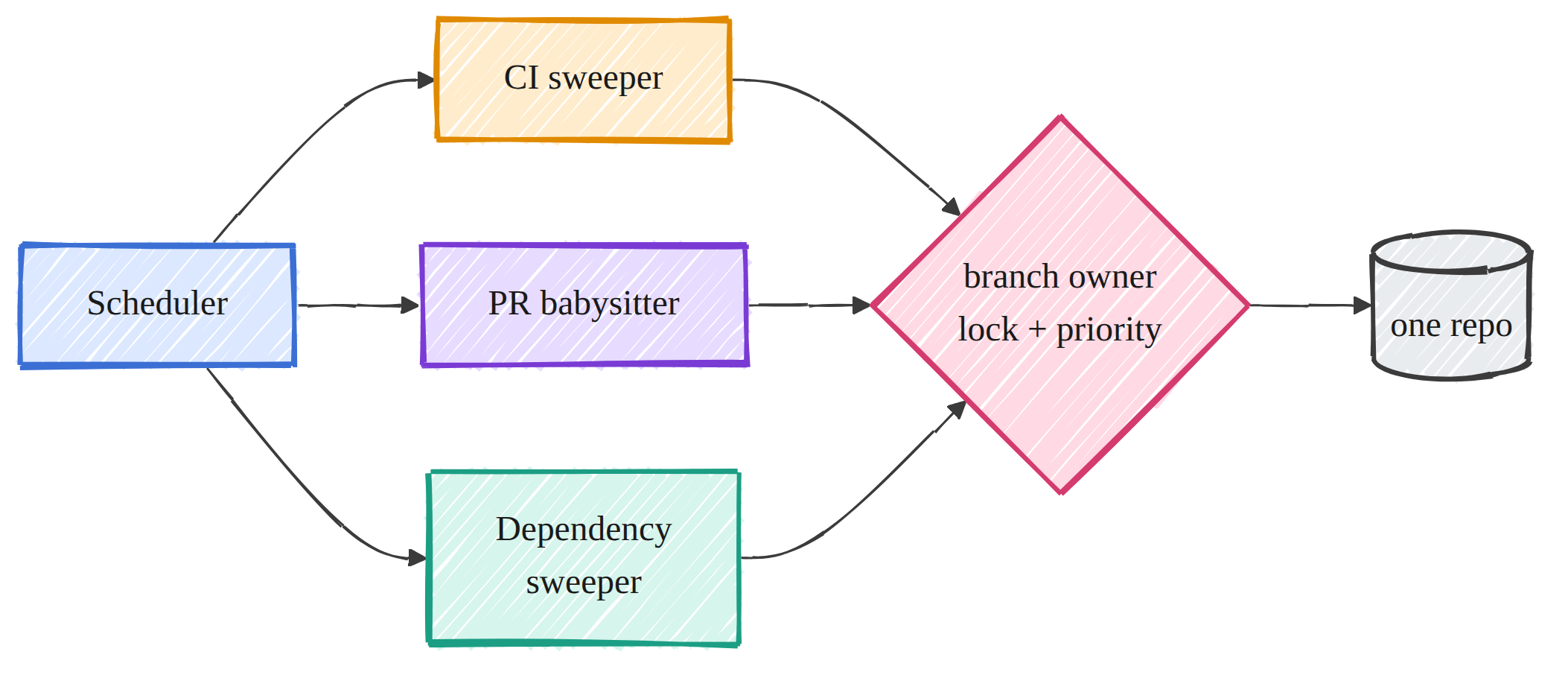
<br><sub><b>07 · Multi loop coordination</b></sub></td>
</tr>
<tr>
<td align="center">
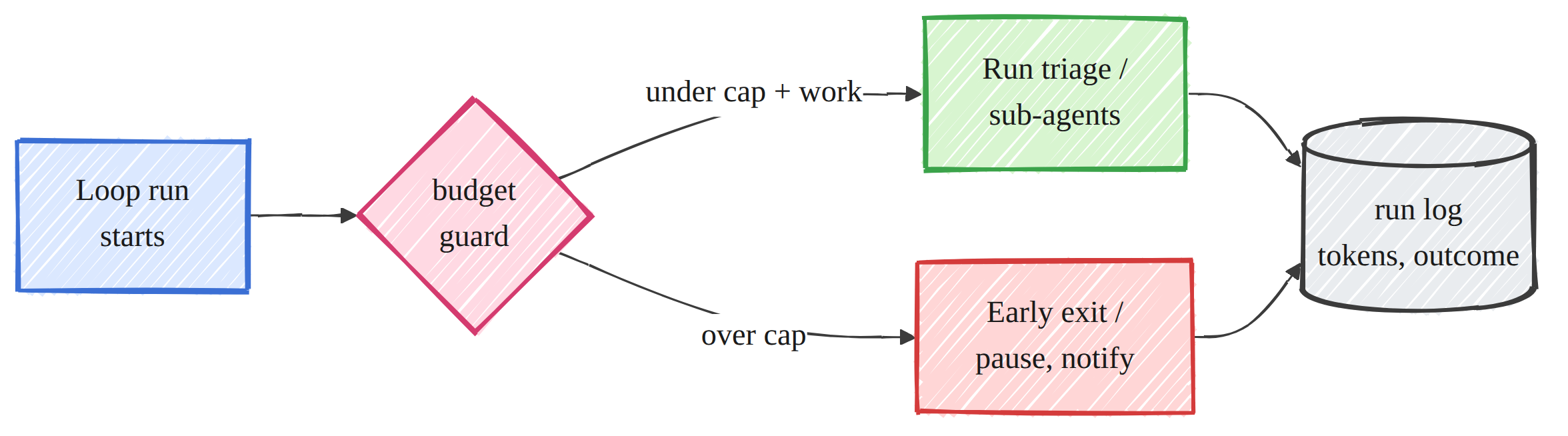
<br><sub><b>08 · Budget and observability</b></sub></td>
<td align="center">
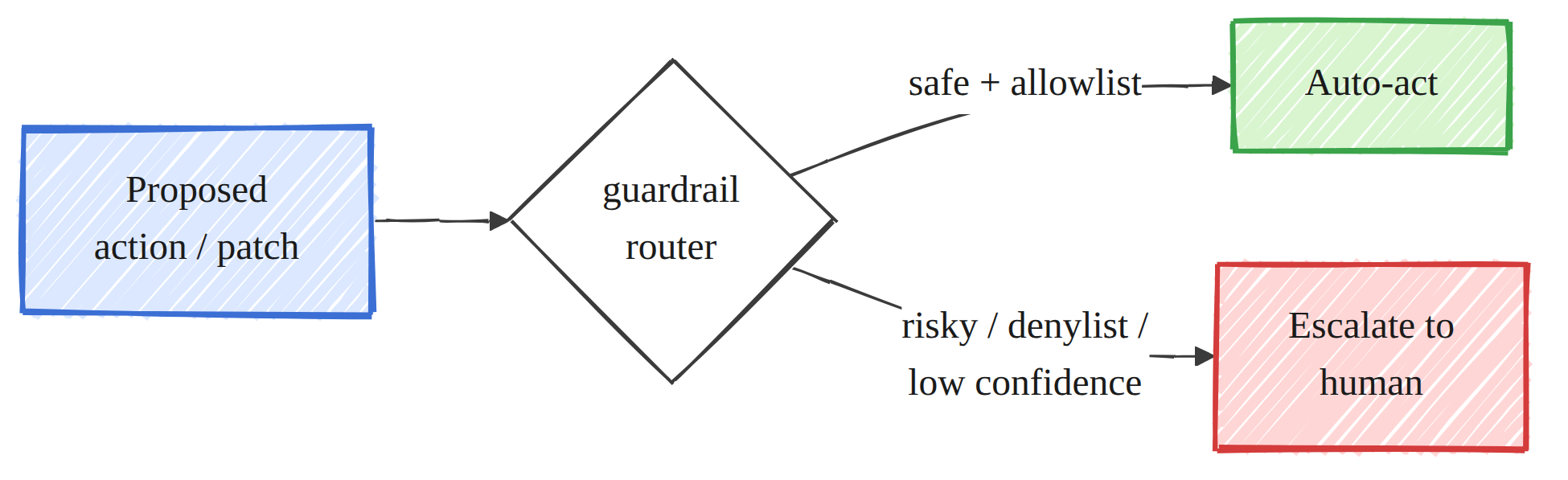
<br><sub><b>09 · Safety guardrails</b></sub></td>
<td align="center">
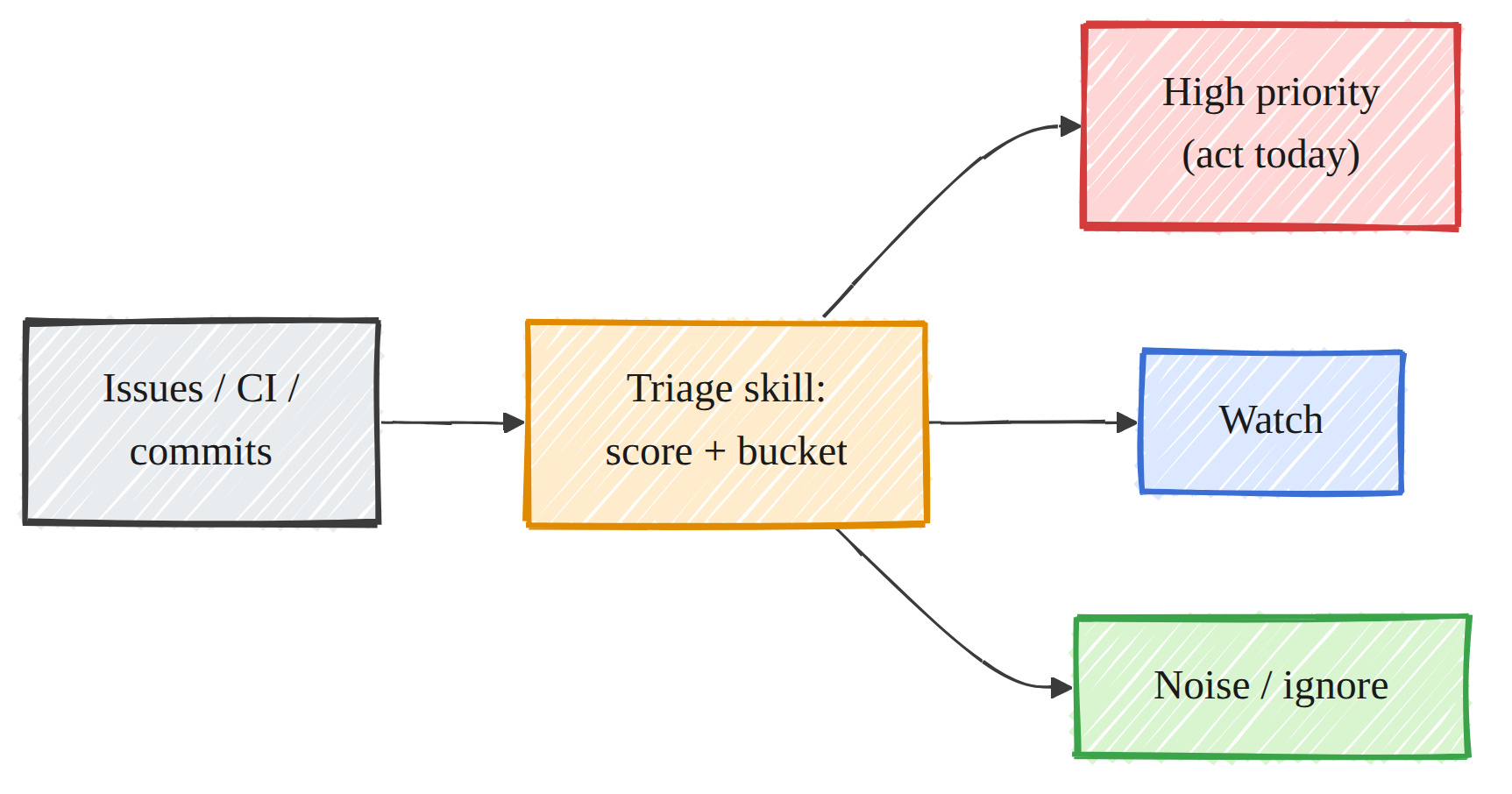
<br><sub><b>10 · Daily triage</b></sub></td>
</tr>
<tr>
<td align="center">
<br><sub><b>12 · CI sweeper</b></sub></td>
<td align="center">

<br><sub><b>13 · PR babysitter</b></sub></td>
<td align="center">
<br><sub><b>14 · Dependency sweeper</b></sub></td>
</tr>
<tr>
<td align="center">
<br><sub><b>15 · Post merge cleanup</b></sub></td>
<td align="center">

<br><sub><b>16 · Changelog drafter</b></sub></td>
<td align="center"><sub>and the capstone composes them all in <b>17</b></sub></td>
</tr>
</table>
📁 Repository layout
.
├── 00_foundations_and_setup.ipynb        # foundations, the shared engine, the trustworthy scorer
├── 01_scheduling_run_until_done.ipynb    # the loop, on MBPP+
├── 02_skills_context_engineering.ipynb   # skills and context, on text to SQL
├── 03_subagents_maker_checker.ipynb      # verifier discrimination, on MBPP+
├── 04_memory_state_rag.ipynb             # retrieval augmented memory
├── 05_worktrees_parallel_isolation.ipynb # parallel isolation on real git
├── 06_connectors_tools.ipynb             # a code execution tool (ReAct)
├── 07_multi_loop_coordination.ipynb      # concurrent loops on one repo
├── 08_budget_cost_observability.ipynb    # the token price of quality
├── 09_safety_guardrails.ipynb            # the auto act vs escalate decision
├── 10_daily_triage.ipynb                 # pattern: prioritize the flood
├── 11_issue_triage.ipynb                 # pattern: duplicate detection
├── 12_ci_sweeper.ipynb                   # pattern: classify before you fix
├── 13_pr_babysitter.ipynb                # pattern: verifier gated state
├── 14_dependency_sweeper.ipynb           # pattern: route updates by risk
├── 15_post_merge_cleanup.ipynb           # pattern: find self admitted tech debt
├── 16_changelog_drafter.ipynb            # pattern: classify and draft notes
├── 17_orchestration_capstone.ipynb       # capstone: compose the primitives
├── common/                               # the shared runtime library (imported by every notebook)
│   ├── llm.py                            # OpenAI compatible client to vLLM, token and latency accounting
│   ├── eval.py                           # the trustworthy scorer (self tested in notebook 00)
│   ├── data.py                           # dataset loaders into a single Problem type
│   ├── memory.py                         # BGE embedding memory: add, index, retrieve
│   ├── agents.py                         # maker and checker building blocks
│   ├── loops.py                          # self refine (run until done) with execution feedback
│   ├── tools.py                          # python tool and a ReAct solver
│   ├── sqltools.py                       # text to SQL schema validity and execution equivalence
│   ├── show.py                           # console style printing and inline diagram embedding
│   ├── plotting.py                       # matplotlib helpers (saved to results and shown inline)
│   ├── runlog.py                         # save metrics and append a structured run log
│   └── tests/test_eval.py               # pytest for the scorer
├── images/                               # 17 hand drawn diagrams embedded by the notebooks
├── results/                              # measured outputs
│   ├── *.json                            # one metrics file per notebook plus the run log
│   └── figures/                          # the matplotlib figures
├── requirements.txt
├── LICENSE
└── README.md
🚀 Getting started
Everything that touches the model runs on one GPU host. The notebooks only need an OpenAI
compatible endpoint, so any host with a comparable CUDA GPU works, on prem or in the cloud.
1. Hardware
A single NVIDIA A100 80GB is what these results were produced on. The generation model is a 4 bit
AWQ quantization of a 32B coder, which together with the vLLM KV cache sits comfortably under
80GB. A smaller card can work if you lower --max-model-len and --gpu-memory-utilization, at
some cost to throughput.
2. Install
python -m venv .venv && source .venv/bin/activate   # Windows: .venv\Scripts\activate
pip install -r requirements.txt
vLLM selects the torch and CUDA build that matches your driver. If a fresh install picks a wheel
that does not match your driver, install vllm on its own first and let it choose the backend, for
example uv pip install vllm --torch-backend=auto, then install the rest.
3. Serve the model
vllm serve Qwen/Qwen2.5-Coder-32B-Instruct-AWQ \
  --port 8000 \
  --max-model-len 16384 \
  --gpu-memory-utilization 0.90 \
  --enable-prefix-caching
Point the notebooks at it (this is the default, so you can skip it if you used port 8000):
export VLLM_BASE_URL=http://localhost:8000/v1The embedding model (BAAI/bge-large-en-v1.5) downloads automatically from the Hub on first use.
4. Run the notebooks
Launch Jupyter from the repository root so the notebooks can import common and resolve the
diagrams in images/:
jupyter lab # then run 00 first, the rest are independentNotebook 00 verifies the engine and runs the scorer self test, so start there. The long running
notebooks are 01, 03, 13, and 17. If you run them headless with nbconvert, do it from the
repository root, or set LEN_PROJECT_ROOT to the repository path.
5. Datasets
Most datasets download automatically. A few are fetched once and pointed at a local path.
| Notebook | Dataset | How to obtain |
|---|---|---|
| 01, 03, 13, 17 | MBPP+ (EvalPlus) | Hugging Face evalplus/mbppplus, automatic |
| 02 | sql-create-context | Hugging Face b-mc2/sql-create-context, automatic |
| 17 | SWE-bench Verified | Hugging Face princeton-nlp/SWE-bench_Verified, automatic; the capstone also runs the official swebench Docker harness on 3 gold patches |
| 10, 11 | GitBugs (hbase project) | the GitBugs dataset (av9ash/GitBugs); download the CSVs and set the notebook's data path |
| 15 | Maldonado SATD | the self admitted technical debt dataset (technical_debt_dataset.csv); download and set the path |
| 16 | Vue commit history | built from the vuejs/core git log, using conventional commit prefixes as ground truth labels |
Notebooks 04, 05, 06, 07, 09, 12, 13, and 14 construct their data in the notebook from real git
operations or realistic labeled action sets, so they need no external download.
🔧 How it works
Every notebook does from common import ... and shares one engine, so a measured difference can
only come from the loop component under test, not from a model swap or a different scorer.
llm.LLMwraps the vLLM endpoint behind an OpenAI compatible client and records token usage
and latency on every call. That accounting is what makes the cost comparisons in notebook 08
honest.evalis the scorer, and notebook 00 does not trust it until it passes a self test:
run_program,check_io,check_asserts,pass_at_k,exact_match,edit_similarity,
sql_exec_match, and the retrieval metrics each grade a known good and a known bad input and
must come back correct, including catching an infinite loop by timeout. A loop optimizes whatever
its scorer rewards, so the scorer is verified before any result is reported.memory.EmbeddingMemoryruns BGE on the GPU and exposes add, index, and retrieve. It is the
read path for state in notebook 04 and the semantic retriever in notebooks 10, 11, and 15.agents,loops,tools, andsqltoolsare the building blocks: single shot
generation, self refinement with real execution feedback, a ReAct tool user, and text to SQL
scoring by schema validity and execution equivalence.showandplottingproduce the heavy inline printing, the embedded diagrams, and the
A and B charts.runlogwrites one metrics JSON per notebook and appends a structured entry
toresults/loop-run-log.json, which notebook 08 reads back to reconstruct the cost model from
real data.
Why a different dataset per component
A single benchmark would let one component look good for the wrong reason. Instead each component
is measured where its failure mode actually bites: run until done on shallow fixable code (MBPP+),
context on text to SQL where a missing schema is fatal, retrieval on facts that live outside the
model, isolation on real concurrent git writes, triage and deduplication on a real bug tracker,
tech debt on a labeled corpus, and orchestration against the real SWE-bench harness. The scorer
changes with the task as well, because pass@1 is the wrong yardstick for a retrieval or a
classification problem.
🧪 Methodology and honest measurement
Three rules shape every notebook, and they are what make the numbers trustworthy.
- Verify the signal before wiring a loop to it. Notebook 00 spends most of its effort not on
the model but on the scorer, because a feedback system is only as good as its measurement. If
the scorer silently passes wrong code, every downstream gain is fiction and a loop will happily
optimize the bug. - The baseline must genuinely fail first. Each notebook shows the naive attempt scoring low or
acting unsafely on real data, then shows the component closing the gap. Where the baseline is
already strong, the notebook says so and treats the small remaining surface as the only place a
loop could help. - Report nulls and saturation as findings. The flat best of N result, the loop saturating on
algorithmic problems, the closed book floor at 7 percent, and the F1 dip in the tech debt
detector are all kept and explained, not hidden. A course that only shows wins teaches the wrong
lesson about when loops help.
The patterns in notebooks 10 to 16 then apply these primitives to operations work (triage,
deduplication, CI, pull requests, dependencies, tech debt, changelogs), and the capstone composes
them into an orchestra and validates the real SWE-bench Docker evaluation, the same ground truth
verifier the whole course argues for.
♻ Reproducing the results
- Bring up a CUDA GPU host and install the requirements.
- Serve the model with the command above and confirm the health check in notebook 00.
- Fetch the few manual datasets and set their local paths.
- Run the notebooks. The fast ones run in seconds to a couple of minutes; 01, 03, and 17 are the
longer ones, and 17 also pulls a Docker image per SWE-bench instance. - Each run rewrites its
results/<name>.jsonand appends toresults/loop-run-log.json. The
results table in this README is maintained by hand from those files.
The captured outputs in the committed notebooks are the record of a real run, so you can read and
audit every number without any GPU at all.
🧠 Model and data
- Generation:
Qwen/Qwen2.5-Coder-32B-Instruct-AWQ, served by vLLM on one A100 80GB. - Embeddings:
BAAI/bge-large-en-v1.5via sentence-transformers on the GPU. - Datasets used: MBPP+ (EvalPlus), a small hand written smoke set, sql-create-context, a
project knowledge base for retrieval, real git repositories, generated data analysis tasks,
GitBugs (hbase), the Maldonado SATD dataset, real Vue commit history, and SWE-bench Verified.
📄 License
Released under the MIT License. See LICENSE.





