
 MongoDB - Build AI That Scales
 Mini tools
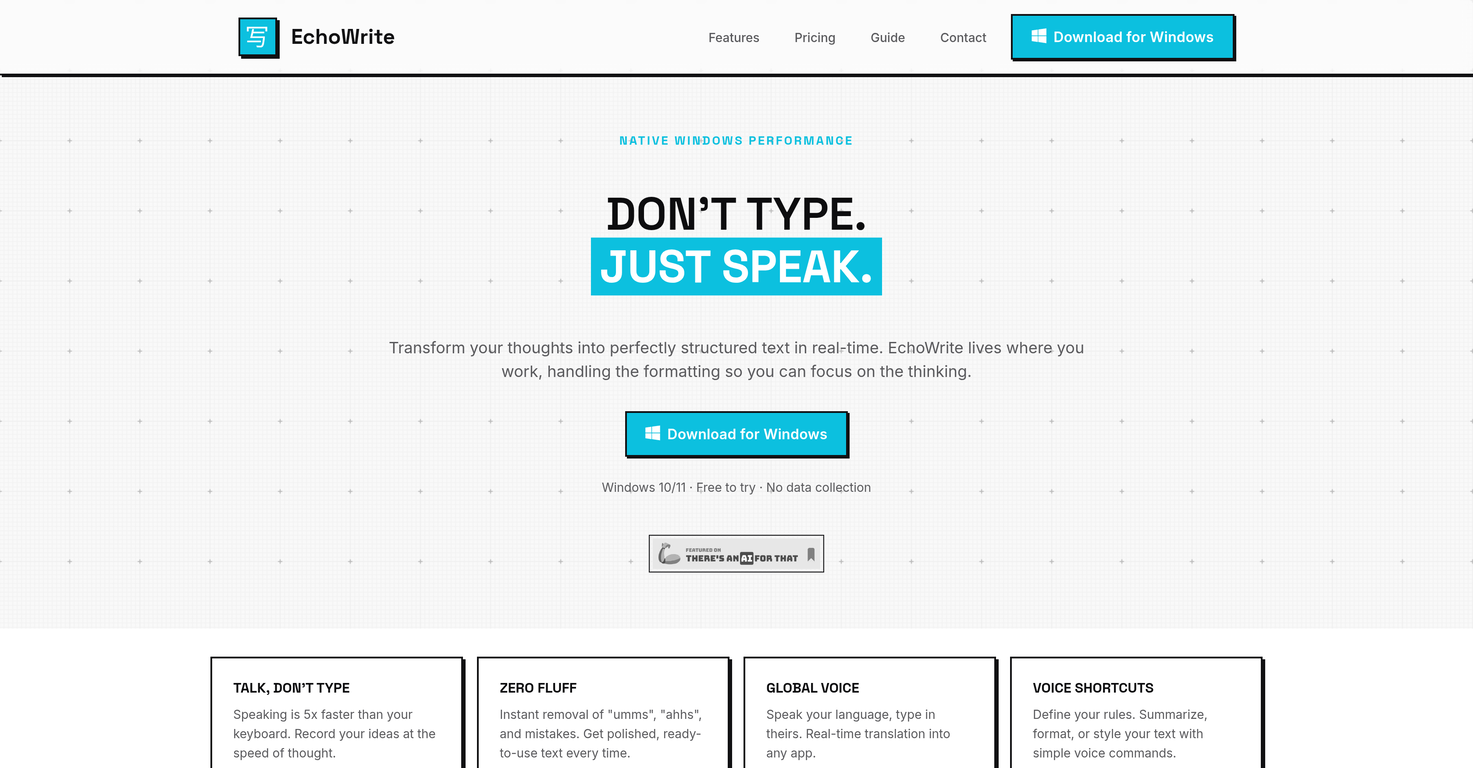
 Don't type text anymore, just speak





 So You Want To Be A Writer?
 Minka
Minka
 Ancient AI powered spirits
 Jvb ai
 somacguffin
 Cuty
Cuty
 Superfly Stoner
 Voicetype AI
 AssemblyAI
 Transcript LOL
 TurboScribe
 RambleFix
 Paraspeech
 Voicy Speech to Text
 ElevenLabs Scribe
 WriteVoice
 Whisper Notes
 Universal-3 Pro by AssemblyAI
 HappySRT
 VoiceTypr
 AirCaption
 Speechmatics | Python SDK
 Vocova
 TalkToText
 Speech to Text
 Transkriptor
 VoicePen App





Overview
EchoWrite is an AI-powered voice dictation software designed for Windows platforms, turning spoken words into structured text within any Windows application.
This tool uses Whisper, OpenAI's automatic speech recognition system, providing users with real-time transcription that captures thoughts swiftly and accurately.
EchoWrite features native Windows integration, providing seamless operation where the user works, and handles text formatting, freeing users to focus on their tasks.
The tool offers unique features such as instant removal of speech fillers and mistakes, yielding polished and ready-to-use text. EchoWrite also supports real-time translation, allowing users to speak in their language and type in another.
Users also have the capability to define voice shortcuts for text summarization, formatting, or styling.Another interesting feature of EchoWrite is its 'custom prompts function' that helps reshape raw speech into professional outputs almost instantly.
It's intelligent enough to help turn a mind dump into a structured document, automatically strip filler words, or dictate logic in plain English and convert the same into clean formatted code.EchoWrite values user's privacy and offers sovereignty over data, either by sending voice data directly to OpenAI using a personal key or running high-performance Whisper models 100% locally.
Lastly, EchoWrite offers an option for a lifetime license, providing unlimited use without monthly AI markups.
Releases

Pricing
Top alternatives
-
 Speak naturally, write perfectly, 4x faster.
 Oliver Boyers🛠️ 1 tool 🙏 17 karmaFeb 13, 2025@Wispr FlowThis is one of those apps that when you use it for the first time, it feels like magic. It is one of the apps that has led to me using it the most every day. It's almost as integral to me now as ChatGPT.
 -
 Type 3x faster with private offline dictation.Spoken Punctuation Say punctuation and symbols by name and Voibe types them as you dictate, instantly and on your Mac. On by default, and you can turn it off anytime in Settings. Spoken Punctuation & Symbols Say a mark or symbol by name and Voibe types it instead of the words. Say "comma" for a comma or "open paren" for an opening bracket, plus @, math signs, currency, and even full email addresses. It happens the instant you speak, entirely on your Mac. Structure By Voice Use "new line", "new paragraph", "bullet point", or "numbered list" to lay out paragraphs and lists while you dictate. Cleaner Transcripts Custom dictionary words are recalled accurately without leaking into your text. Stability & Setup Fixes More Reliable Model Downloads Models now download with an integrity check, so a wrong or corrupted download no longer breaks transcription. If a download does fail, you can reach us directly with a new Contact Support option. Audio Handling While Dictating Improved how Voibe manages other audio playing on your Mac while you dictate. Live Dictation Watch your words appear as you speak, and edit them before they land. Live Dictation A new third dictation mode. Your words appear on screen as you speak, so you can read along and make edits before the text lands in your app. Like every mode, it transcribes entirely on your Mac. Cancel a Dictation Instantly Press Escape to discard the current dictation before it's inserted. Improved Simpler Default Hotkeys Hands-Free now starts with Fn+Space, and a quick double-tap of Fn works too. You can also assign function keys like F1 and F2, and choose your own key combination for Push-to-Talk. Refreshed App Icon A cleaner look for the Dock and menu bar icons.
 -
 Seamless speech-to-text in every app.Spokenly feels genuinely practical for people who prefer talking through ideas instead of typing everything manually. I also like that offline/local support is included since a lot of dictation tools still depend completely on the cloud.
 -
 Voice-driven text editing for effortless document creation.
 -
 Speak instead of type: three times faster.
 -
 Write at the speed of your thoughts







