Go to section
Sponsor
 Wispr Flow - Don’t type, just speak
🎤 Dictation
Wispr Flow - Don’t type, just speak
🎤 Dictation
The front page of AI.Used by 90M+ humans.

TAAFT Tutorial
Generate image
Tasks
Generate text
Free mode
Trending
Leaderboard
Characters
 Mini tools
New
Featured
Lists
Agents
Requests
Jobs
Map
Newsletter
Starter pack
Free tools
Speech to text
Text translator
Remove background
Settings
Edit profile
My tools
Gallery
Dashboard
Inbox
Get featured
Contact TAAFT
For you
Popular
Job impact index
Most saved
Affiliate program
Submit AI tool
Notification preferences
Glossary
Home
Timeline
My profile
Create tool
Deals
Companies
Models
Robots
Papers
Fundraises
Repositories
Devices
Organizations
Events
Prompt Pack
Merchendise
Credits
APIs
Features
Tools
Countries
Collections
Mini tools
New
Featured
Lists
Agents
Requests
Jobs
Map
Newsletter
Starter pack
Free tools
Speech to text
Text translator
Remove background
Settings
Edit profile
My tools
Gallery
Dashboard
Inbox
Get featured
Contact TAAFT
For you
Popular
Job impact index
Most saved
Affiliate program
Submit AI tool
Notification preferences
Glossary
Home
Timeline
My profile
Create tool
Deals
Companies
Models
Robots
Papers
Fundraises
Repositories
Devices
Organizations
Events
Prompt Pack
Merchendise
Credits
APIs
Features
Tools
Countries
Collections
Mini tools
New
Featured
Lists
Agents
Requests
Jobs
Map
Newsletter
Starter pack
Free tools
Speech to text
Text translator
Remove background
Settings
Edit profile
My tools
Gallery
Dashboard
Inbox
Get featured
Contact TAAFT
For you
Popular
Job impact index
Most saved
Affiliate program
Submit AI tool
Notification preferences
Glossary
Home
Timeline
My profile
Create tool
Deals
Companies
Models
Robots
Papers
Fundraises
Repositories
Devices
Organizations
Events
Prompt Pack
Merchendise
Credits
APIs
Features
Tools
Countries
Collections

▼ Latest
Research aid
Free mode
100% free
Freemium
Free Trial
Featured matches
-
 SurfMind Wave🛠️ 1 tool 🙏 7 karmaMar 26, 2026@SurfMindHello 👋, I'm Luc, surfmind creator. I built this tool to solve my own problem of getting instant AI assistance on tab without switching tabs and disrupting my flows. I hope you find it just as helpful!
 -
 Gistr has been a game changer for processing long YouTube videos and PDFs - saves hours and actually helps you retain what you consume.
 -
-
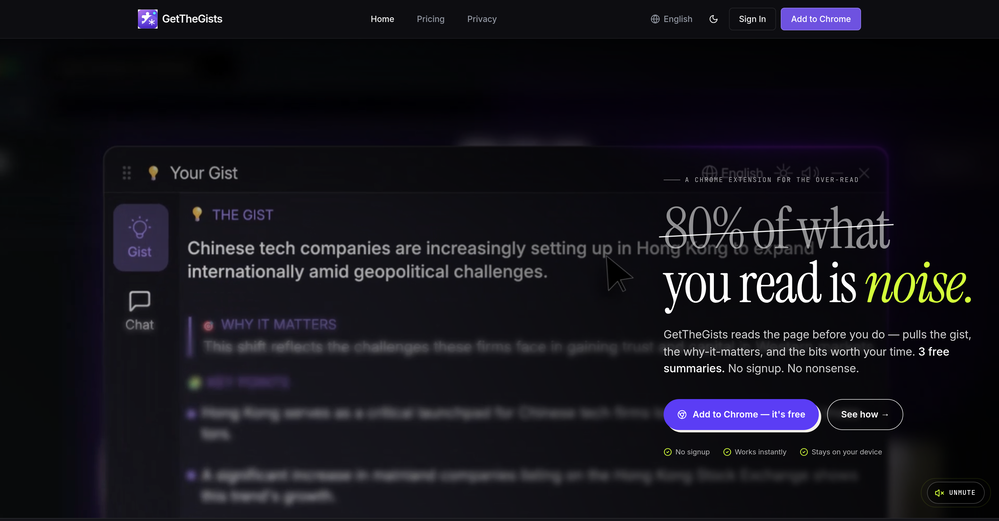 This started from a small frustration that wouldn't go away: I'd open 12 tabs for "research," skim none of them properly, and close my laptop feeling more behind than when I started. The web rewards reading speed, not reading depth — and I wanted a tool that flipped that. So I built GetTheGists: a Chrome extension that gives you the gist of any page in 3 seconds, then lets you ask follow-up questions like you would a smart friend who already read it. A few things we went out of our way to get right: - Cognitive hierarchy, not walls of text. Every summary is structured as Gist → Why It Matters → Key Takeaways → Implications. Compression before precision. - Ask, don't just read. Hit the page with follow-ups, get answers grounded in the content. - 20 languages, full dark mode, and a resizable side panel that actually respects your screen. What surprised me building this: the hardest part wasn't the AI — it was deciding what not to show. Every iteration was about removing a section, not adding one. It's free to try (Premium and Pro tiers if you want higher limits). I'd love your honest feedback — especially on the summary format and where it falls short on your favorite kind of page. I'll be in the comments all day. Thank you for taking a look 🙏
 -
-
-
-
-

-







Verified tools
-
We are launching first of its kind AI Vision Search App.
-
 AI-powered ICP generator for data-driven customer insightsOpenElsa AI is an intuitive, powerful tool that delivers deep customer insights in minutes, transforming days of research into instant, actionable intelligence.
 -
 OpenKeep it free bro, you will break the internet soon
 -
Message i get when i try to access the tool from this page." Sorry, you have been blocked You are unable to access finlo.io". If they are not interested request TAAIFT to remove this if they are not interested in wider community from the platform.Very rude.. Alteast should advise to include why they block users like this.
- SponsorWispr Flow - Don’t type, just speak🎤 Dictation
-
Amazing tool for my school assignments!
-
There's An AI For That — v2 Release Changelog The front page of AI. TAAFT started as the place to find newly launched AI tools. With v2, it's now the place to track everything happening in AI: the tools, the companies building them, the models shipping, the money moving, and the news breaking. Here's what changed. 1. Our homepage got a full revamp. The homepage isn't just a tool directory anymore. It's a live view of the whole AI landscape. From one screen you can explore and filter across Tools, Companies, Countries, Tasks, Models, Papers, News, Robots, Devices, and the rest of the AI world. Whatever you're looking for, you can get to it straight from the front page. 2. Rows instead of cards We dropped the old three-column card grid for a clean row-based layout. It's more compact, and it shows a lot more at once. Pricing, task, release date, country, and views are all right there, so you can scan and compare without scrolling forever. 3. More than a launch board TAAFT used to be a feed where people launched tools. It still does that, but now there's a lot more underneath. You can dig into the companies behind the tools and filter them by Profitable, Unicorns, AI Native, sector, and more. It's a way to follow the players, not just their products. 4. New sections Companies — Filter every major AI company by valuation, valuation per employee, profitability, and sector. Countries — See which countries lead in AI, who has the biggest market cap, and where investors are putting their money. Tasks — Explore where AI is having the biggest impact, organized by what the tools actually do. Models — Track new models as they drop, who built them, what they do, and whether they're open source. News — Follow what's trending in AI right now, with topic tags, sources, and community voting. Collections — Curated packs of the best AI tools for a specific job, built and shared by the community. Fundraises — Keep up with the money moving in AI. See who just raised, the round, the size, the valuation, and the date, so you always know where the capital is flowing. Investors — Browse the funds and companies backing AI. Sort by total invested, number of investments, type, and country, and see which big rounds they've been part of. Repositories — Track the open source side of AI. See top repos by stars, forks, license, and recent activity, all tied back to the companies behind them. Robots — Follow the hardware. Browse robots by company, category, country, availability, price, and release date, from humanoids to manipulators. Devices — Keep an eye on AI hardware beyond robots: smart glasses, wearables, earbuds, speakers, and more, with availability, price, and what each one is actually for. Papers — Dig into the research behind it all. Browse AI papers by company, with publish dates, authors, venues, and featured picks, plus a link straight to the source. The short version TAAFT isn't just where tools get launched anymore. It's where you keep up with all of AI in one place. Welcome to v2.
-
A lot of humanizer software is actually just gpt wrappers to do this by asking gpt to rewrite with some different voice. Ace Essay does have their own AI that does a better job at humanizing.
-
I’d say this is one of the best chatbots I’ve used so far. The side-by-side comparison view is super handy for spotting bias and made-up, and the custom bots actually have decent memory, which is rare. Just a heads up: no image generation or voice mode. Other than that, it’s pretty solid.
-
Hi Taaft community! I’m the creator of ConceptViz. We built this tool specifically for educators and researchers who deal with complex information daily. ConceptViz uses AI to instantly transform dense lesson plans, curriculum notes, or research frameworks into clear, structured diagrams. Our goal is to help K12 teachers make abstract concepts tangible for students and to help researchers map out logical workflows without the manual drudgery of drawing. I’d love to hear how this fits into your academic or classroom workflow—your feedback will help us build a better tool for the education community! 🚀
-
Aithor is an excellent tool for writing scientific essays. The best part is that it shows real references. This means your generated text is validated. Other tools, like Gemini or Chatgpt, frequently give wrong citations and references, even nonexistent ones.
-
idk how but tokens are cheaper than claude and chatgpt
-
Hey Guys! 👋 I built TonesMatch because chasing guitar tone is still way too messy. Most guitarists have done the same thing: search “Metallica amp settings” or “Hotel California guitar tone,” copy some random settings from a forum, and then realize they do not really work on their own amp. The problem is that tone settings are not universal. A Marshall Plexi, Boss Katana, Fender Blues Jr, and Line 6 Helix all respond differently. A general AI tool might suggest a channel, knob, or setting that sounds right in theory but does not even exist on your gear. TonesMatch solves this by combining researched real-world tone data with gear-aware AI. You type a song, choose your guitar, amp, and pedals, and TonesMatch adapts the target tone to your actual rig. It gives you practical settings you can actually dial in: amp channel, gain, EQ, pickup position, effects, and pedal chain suggestions. What makes it different: - Built on researched tone and gear data, not generic guesses - Adapts settings to your specific guitar, amp, pickups, and pedals - Supports both guitar and bass - Avoids recommending controls that do not exist on your amp - Includes a growing database of 13,000+ researched tones Would love feedback from guitarists, bassists, producers, and anyone who has ever spent too long chasing the perfect tone. Thanks for checking it out!
-
PDF Digest is a helpful AI tool that makes working with PDF files easier and saves time.
-
Process patient referral documents way faster now. Pulls key medical history and relevant details instantly instead of me scanning through pages. Still review everything carefully but it flags what matters first.
-
 Search real papers and write literature reviews without AI hallucinations.Open
 -
This AI PDF Summarizer worked really well
-
-
I found AHelp during its ProductHunt launch. Tried its free tools and was quite satisfied. That's why plan to use them often.
-
The tool is posted since 2024-01-04.
-
Amazing presentations, and for free!!11
-
-
-
I’ve been using it for a month now and I have decided to keep it for a year. There definitely are some kinks they can still work out like file management, but it’s very good at it’s core function: it generally does a good job answering questions and most times identifies PDFs automatically and correctly. The browser plugin works great, and it’s very nice that Papers allows you to add your university’s library API so you can automatically download PDFs that are accessible through your institution (sometimes it refuses to download some papers, so you just have to downlow it yourself and manually add it). The iPad and Android apps are serviceable. Every once in a while it will mess up the PDF identification, especially with papers from either very old sources or online-only journals. Things they must work on: * A much better system to annotate PDFs (the post-it type notes are cumbersome). * Introduce a notepad attached to each PDF or some way to easily link and save the AI’s output to the PDF. Currently, you have to add a little post it note and then paste the text there. * Keep the AI answers available after closing the documents. If you close the document by mistake or have several open and wish to close some, the ai conversation will be reset. * I REALLY wish that you could get citations and links to where the info was from extracted from PDFs. Currently, I have found Coral.ai does a much better job of showing you where the info came from and it even highlights it for you. Give it a try, their 30-day no credit card needed trial allowed me to truly test it, and now I’m a yearly subscriber looking forward for new additions and releases.










































Other tools
-
-
Great for skimming research papers and reports
-
Try out the FREE AI Academic Writing Assistance Today!
- Didn't find the AI you were looking for?
-
 Open
Open -
 Open
Open -
Doesn't work on a PDF I uploaded. Seems like it just wants to collect (l)users.
-
This was a HUGE let down. I wanted this to work more than anybody! I've been searching for exactly this for months and so far it's been fruitless.. When I stumbled across this and it did everything that I needed it to do, it would give you the key points it would make it more comprehensive it would give you as much detail as you wanted and it had a free seven day trial and it was unlimited with no credit system (as long as you purchased the plan). It was like I had created it because it is exactly what I was looking for, after I signed up I started to do my happy dance and then I uploaded a file so I could get the show on the road..... and nothing.... it kept trying to upload and it absolutely would not give me any summary or anything just kept loading and loading and loading.... I could view the file and the file would show up after a while but there would still be no summaries so in essence the program is broken which broke my freaking heart. if this starts working again somebody please reply to this comment and let me know I really have faith in this program and I really wanna use it. I don't want to do this but I have to give it 2 stars for the time being....
-
-
Not available for Windows or Android. No information on pricing.
-
Handles long texts really well. Super useful if you’re into detailed content but want the quick version without losing key info.
-
-
 Transform ideas into compelling copy instantly.Open
 -
-
-
-
-
The free interface delivers lorum ipsum text and requests and upgrade to see or expan. This is worthless. The process was good, the setting up was easy and intuitive, it was just that the free option was absolutely worthless, and no matter how good the tool is when paid, I won't find out as the initial contact was frustrating, disappointing and a true waste of effort.
-
 AI-powered research assistant for diverse content analysis.Open
 -
 AI researcher: Questions to literature reviews from 200M+ papers.OpenThis is a great tool for researches like us and our research community, it makes the literature review so easy. all the data is extracted automatically related to our query along with citation. Truly commendable tool and recommendable to those who are not using it till now.
 -
Not particularly useful and expensive at the same time. Don’t waste your time or money.
-
Think its a fab tool but why wont it allow you to save your workflows?
-
 Transform ideas into vivid 8-bit pixel art.Open
 -
 Transform dry text into engaging, human-like content.Open
 -
 Transform ideas into vibrant 8-bit pixel art scenes.Open
 -
 Transform ideas into stunning visuals with AI.Open
 -
 Open
Open -
 Creates stunning 8K photorealistic images of literary characters.Open
 -