Go to section
Sponsor
 MongoDB - Build AI That Scales
🗄️ Database
MongoDB - Build AI That Scales
🗄️ Database
The front page of AI.Used by 90M+ humans.

TAAFT Tutorial
Generate image
Tasks
Generate text
Free mode
Trending
Leaderboard
Characters
 Mini tools
New
Featured
Lists
Agents
Requests
Jobs
Map
Newsletter
Starter pack
Free tools
Speech to text
Text translator
Remove background
Settings
Edit profile
My tools
Gallery
Dashboard
Inbox
Get featured
Contact TAAFT
For you
Popular
Job impact index
Most saved
Affiliate program
Submit AI tool
Notification preferences
Glossary
Home
Timeline
My profile
Create tool
Deals
Companies
Models
Robots
Papers
Fundraises
Repositories
Devices
Organizations
Events
Prompt Pack
Merchendise
Credits
APIs
Features
Tools
Countries
Collections
Mini tools
New
Featured
Lists
Agents
Requests
Jobs
Map
Newsletter
Starter pack
Free tools
Speech to text
Text translator
Remove background
Settings
Edit profile
My tools
Gallery
Dashboard
Inbox
Get featured
Contact TAAFT
For you
Popular
Job impact index
Most saved
Affiliate program
Submit AI tool
Notification preferences
Glossary
Home
Timeline
My profile
Create tool
Deals
Companies
Models
Robots
Papers
Fundraises
Repositories
Devices
Organizations
Events
Prompt Pack
Merchendise
Credits
APIs
Features
Tools
Countries
Collections
Mini tools
New
Featured
Lists
Agents
Requests
Jobs
Map
Newsletter
Starter pack
Free tools
Speech to text
Text translator
Remove background
Settings
Edit profile
My tools
Gallery
Dashboard
Inbox
Get featured
Contact TAAFT
For you
Popular
Job impact index
Most saved
Affiliate program
Submit AI tool
Notification preferences
Glossary
Home
Timeline
My profile
Create tool
Deals
Companies
Models
Robots
Papers
Fundraises
Repositories
Devices
Organizations
Events
Prompt Pack
Merchendise
Credits
APIs
Features
Tools
Countries
Collections

▼ Top rated
Text editor
Free mode
100% free
Freemium
Free Trial
Featured matches
-
-
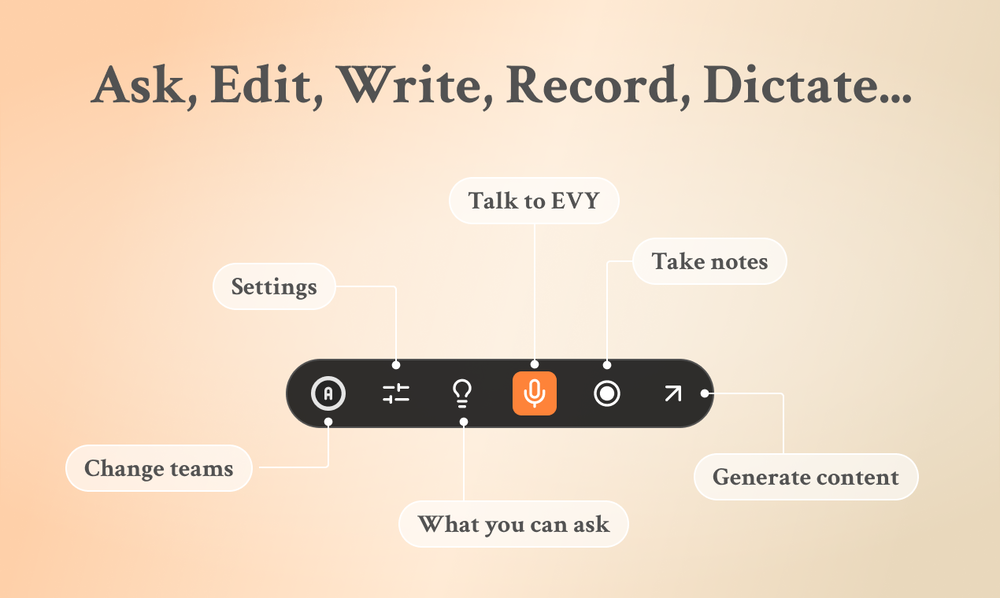
 Eugen Petersen🛠️ 1 tool 🙏 3 karmaFeb 13, 2026@EVY - your AI co-creatorUse it every day! Best AI support for work
 -
-

-
-
-
-
-
 Open
Open
-








Other tools
-
-
The output images are great, there are many features, and you can upload any picture to generate a complete set of e-commerce product images with one click. I feel like I can fire my company's graphic designer.
- SponsorMongoDB - Build AI That Scales🗄️ Database
-
 Add accurate, multilingual subtitles to videos - fast, right in your browser.OpenThis one is CRAAAAAZY! drop your MP4/MOV, it locks captions to speech cleanly (also multi-language), the in-browser editor is solid and you can either export SRT for youtube or burn the subs in shorts with a couple clicks. it's a W for creators :D
 -
 OpenIf you care about control over your data, this tool is for you! Looking forward to your questions and feedback. Thank you ❤️
 - Didn't find the AI you were looking for?
-
Great product! Summaries, social media content, promo content and more, all generated once we upload our episode. It's saved us a ****load of time!!
-
Pretty good tool for writing assignments or essays even, easy to use, gives a structured way to use AI and the outputs are better than expected, looks human.
-
 Open
Open -
 Translate and edit webpages with AI in seconds.Open
 -
I recently started using Napkin AI, and I couldn't be more impressed! This tool is incredibly user-friendly and intuitive, making it easy to generate clear visual representations from text. Moreover, the interface is clean and visually appealing, which enhances the overall user experience. Napkin AI is a fantastic companion. Highly recommended for anyone looking to elevate their creative process!
-
Made writing my first book simple and fast. I turned scattered ideas into a full, professional manuscript in a weekend. The guided flow kept me focused, and the editing felt natural.
-
Supertranslate est un outil basé sur l'IA qui permet aux utilisateurs d'ajouter automatiquement des sous-titres anglais aux vidéos dans n'importe quelle langue. Il est alimenté par Whisper d'OpenAI, le moteur de synthèse vocale le plus précis au monde. Le processus est simple et direct : les utilisateurs peuvent télécharger une vidéo dans n'importe quelle langue sur la plateforme, générer des sous-titres, puis télécharger le fichier .srt ou .vtt. La plateforme dispose également d'un éditeur de sous-titres intuitif qui permet aux utilisateurs de diviser, fusionner et ajuster les codes temporels des sous-titres générés. Supertranslate est gratuit, sans carte de crédit requise et peut être annulé à tout moment.
-
best part? it doesn't fight my process. i can iterate fast, try different moods and play with compositions while the idea's still hot.